
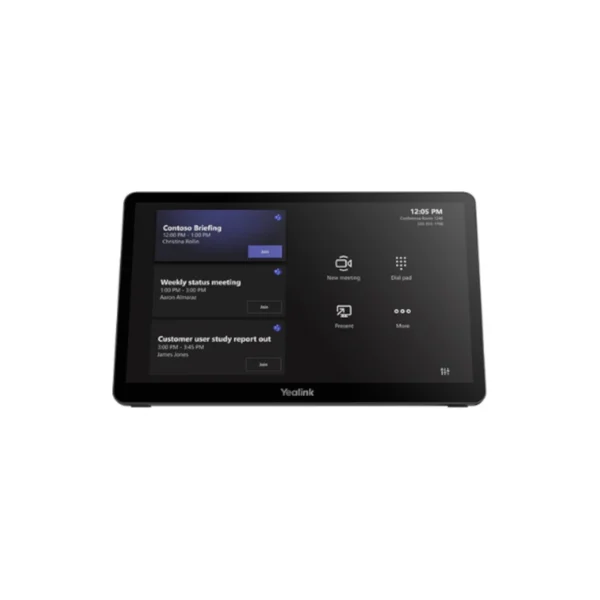

Yealink MTouch Plus Touch Panel
Modern meeting rooms need technology that is easy to use, flexible to deploy and capable of supporting different working styles. The Yealink MTouch Plus is designed to provide a central, intuitive touch interface for professional meeting environments, giving users straightforward control over meetings and collaboration functions from an 11.6-inch display.
With its 11.6-inch anti-fingerprint and anti-glare IPS display, the MTouch Plus delivers a comfortable viewing and touch experience while helping minimise visible fingerprints during frequent use. The display provides 1920 × 1080 resolution, while 10-point multi-touch allows responsive interaction with compatible meeting-room functions.
For South African businesses, this makes the MTouch Plus particularly relevant to boardrooms, training rooms, executive meeting spaces and hybrid collaboration areas where different employees, clients and remote participants may need to interact with the meeting system.
Key Features & Business-Class Highlights
11.6-inch Full HD IPS Touch Display
The MTouch Plus features an 11.6-inch IPS screen with 1920 × 1080 resolution. The narrow-frame design provides a modern appearance, while the anti-glare and anti-fingerprint treatment is suited to environments where the panel is used repeatedly throughout the working day.
The display is also rated at 290 cd/m² brightness with a 1000:1 contrast ratio, providing a clear interface for meeting controls and collaboration functions.
Responsive 10-Point Multi-Touch
With support for 10-point multi-touch, users can interact naturally with the interface rather than relying on physical buttons or a separate keyboard and mouse. This is useful in collaborative meeting environments where quick access to controls can help keep discussions moving.
The MTouch Plus also supports configurations involving multiple touch panels, allowing different participants or areas of a larger room to have access to meeting controls when supported by the relevant Yealink solution.
Wireless BYOD and Screen Sharing
Hybrid meetings often involve participants bringing their own laptops or mobile devices. The MTouch Plus supports wireless BYOD and third-party screen-sharing functionality, helping businesses accommodate different presentation requirements without making every participant rely on the same physical connection method.
For South African offices where employees may move between home, branch and office environments, this flexibility can be particularly useful. A meeting room can remain permanently configured while employees connect their own devices when needed.
Flexible Installation Options
A major benefit for businesses is the MTouch Plus’s flexible deployment design. The panel can be installed in different positions depending on the room layout, including wall mounting, flat placement and desktop installation using the appropriate expansion bracket.
This makes it suitable for everything from compact SME meeting rooms to larger corporate boardrooms. The installation can be planned around the furniture and room configuration rather than forcing the business to redesign the space around the technology.
RoomSensor Integration
The MTouch Plus can work with the Yealink RoomSensor to support automatic wake-up functionality. When configured as part of a compatible Yealink meeting-room solution, the system can detect participants entering the room and automatically wake the meeting-room system.
For businesses managing multiple meeting spaces, features such as automatic wake-up can help reduce unnecessary interaction with equipment and make the room feel more ready for use.
Designed for Professional Meeting Spaces
The MTouch Plus is not simply a general-purpose touchscreen. It is specifically designed as a meeting-room control panel, making it a practical addition to professional collaboration environments.
South African businesses can use it in executive boardrooms, internal meeting rooms, training facilities, client presentation spaces and hybrid-work environments. For SMEs, it can provide a polished meeting-room experience without requiring users to understand complicated technical controls. For larger organisations, standardised meeting-room hardware can make it easier for employees to move between rooms and interact with familiar interfaces.
If you’re building a complete Yealink meeting-room setup, explore our [Yealink products]([Item brand link]) or browse our [Meeting Room & Video Conferencing category]([Item category category link]) for compatible solutions and accessories.
Connectivity and Compatibility
The MTouch Plus supports Wi-Fi 802.11 a/b/g/n/ac/ax and Bluetooth 5.2, while the specification also includes HDMI 2.0 input. These connectivity options help integrate the touch panel into a modern meeting-room environment.
Businesses should, however, check compatibility between the MTouch Plus, their selected Yealink meeting-room platform and any additional peripherals before deployment. Yealink maintains compatibility documentation for its room-system accessories and devices, making it useful to confirm the intended configuration before purchasing.
For product documentation, compatibility information and software resources, visit the official Yealink Support page.
A Practical Choice for Hybrid Work
Hybrid working has changed what businesses expect from meeting rooms. A modern meeting space needs to accommodate people physically in the room as well as colleagues, suppliers, customers and partners joining remotely.
The Yealink MTouch Plus provides a dedicated interface for managing meetings without requiring users to operate a computer throughout the session. Its large Full HD touch display, multi-touch capability, flexible installation options and collaboration features make it suitable for professional environments where simplicity and consistency matter.
For South African companies, this can be particularly useful in businesses operating across Johannesburg, Cape Town, Durban and other locations where teams may regularly collaborate across offices or with remote employees. A consistent meeting-room setup can help reduce the learning curve for staff and create a more predictable experience for clients visiting the office.
The MTouch Plus can also form part of a wider Yealink ecosystem. Its compatibility with selected Yealink room hardware and accessories allows businesses to build meeting-room solutions around their specific requirements rather than treating the touch panel as an isolated device.
Pros and Cons
Pros
- 11.6-inch Full HD IPS touchscreen provides a clear, dedicated meeting-control interface.
- Anti-glare and anti-fingerprint screen is practical for frequent business use.
- 10-point multi-touch supports intuitive interaction.
- Multiple-panel control can support larger or more collaborative meeting spaces.
- Wireless BYOD and third-party screen sharing add flexibility for hybrid meetings.
- Three deployment methods provide flexibility for different room layouts.
- Wi-Fi 6-compatible 802.11ax connectivity and Bluetooth 5.2 support modern meeting-room integration.
- RoomSensor integration can enable automatic system wake-up in compatible configurations.
Cons
- Designed specifically for compatible meeting-room environments, rather than as a standalone general-purpose tablet.
- Some advanced features depend on compatible Yealink hardware, software versions or supported configurations.
- Businesses should confirm compatibility with their existing meeting-room equipment before purchase.
- Installation and configuration may require IT or AV support for corporate deployments.
Complete Technical Specifications
| Specification | Details |
|---|---|
| Product | Yealink MTouch Plus |
| SKU | MTOUCH PLUS |
| Product Type | Meeting Room Touch Panel |
| Screen Size | 11.6-inch |
| Display Type | IPS |
| Resolution | 1920 × 1080 / Full HD |
| Screen Finish | Anti-fingerprint & Anti-glare |
| Touch Support | 10-point multi-touch |
| Screen Brightness | 290 cd/m² |
| Contrast Ratio | 1000:1 |
| Screen Protection | Scratch-resistant screen |
| Wi-Fi | IEEE 802.11 a/b/g/n/ac/ax |
| Bluetooth | Bluetooth 5.2 |
| HDMI | HDMI 2.0 ingest |
| Multiple Touch Panels | Supported* |
| Third-Party Screen Sharing | Supported* |
| Wireless BYOD | Supported* |
| PC Power Supply | Supported for content sharing via USB Type-C PD* |
| RoomSensor Integration | Supported* |
| Deployment Options | Wall mount, flat placement, desktop |
| Target Environment | Professional meeting rooms / conference rooms |
| Generation | Third-generation Yealink touch panel |
| Vendor | Yealink |
| EAN | Not provided in supplied product data |





Reviews
There are no reviews yet.