
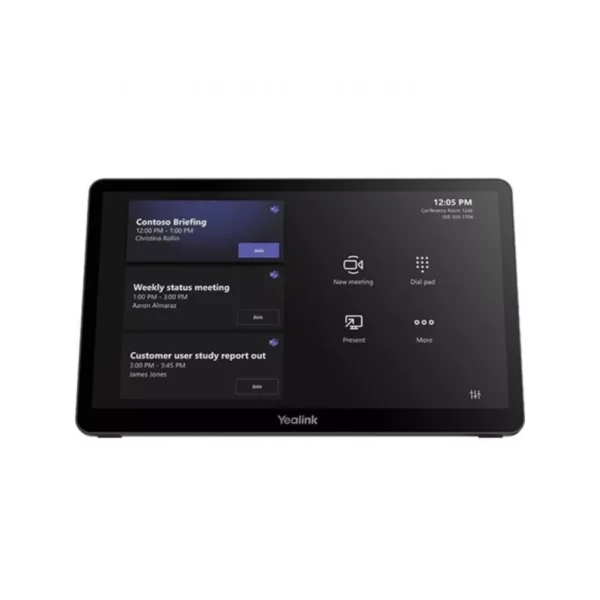

Yealink MTouch Plus-EXT Touch Panel for Flexible Meeting-Room Control
The Yealink MTouch Plus-EXT Touch Panel is designed for organisations that need a more flexible and convenient way to manage meetings and video conferencing. As an extension accessory for the Yealink MTouch Plus, it allows businesses to add additional touch-control positions around a meeting room, helping participants access conference controls without having to rely on a single central console.
For South African businesses operating hybrid workplaces, shared meeting rooms and corporate conferencing environments, having accessible meeting controls can make a noticeable difference to the overall user experience. The MTouch Plus-EXT provides an additional touchscreen interface that can be positioned where it is most convenient, whether on a boardroom table, fixed into a desktop or mounted on a wall.
Its 11.6-inch capacitive touchscreen provides a clear and responsive control surface, while the narrow-bezel design delivers an 80% screen-to-body ratio. The 1920 × 1080 Full HD resolution provides crisp on-screen visibility, making meeting controls easier to view across different lighting and seating positions.
Key Features & Business-Class Highlights
11.6-inch Full HD Capacitive Touchscreen
The MTouch Plus-EXT features an 11.6-inch capacitive display with a 1920 × 1080 resolution. The responsive touchscreen provides an intuitive way to interact with supported meeting-room functions, helping reduce the learning curve for employees and guests.
The narrow-bezel design also gives the panel a modern appearance that fits neatly into professional boardrooms, executive meeting rooms and collaborative spaces.
Expand Your MTouch Plus Control Environment
One of the key advantages of the MTouch Plus-EXT is its ability to work alongside the MTouch Plus to create a multi-touch console solution.
A single MTouch Plus can support up to four MTouch Plus-EXT touch panels, allowing multiple control points to be positioned around a meeting space. This can be particularly useful in larger boardrooms where participants may be seated some distance from the primary conference console.
For businesses with multiple users collaborating simultaneously, additional control points can provide greater convenience and flexibility.
Flexible Deployment Options
The MTouch Plus-EXT is designed to accommodate different meeting-room layouts. It can be placed directly on a desktop, fixed to a desktop or mounted on a wall.
This flexibility makes it suitable for everything from smaller huddle rooms and training rooms to larger corporate boardrooms. Organisations can position the panel according to the room’s layout rather than being restricted to a single installation style.
Simple PoE Deployment
Installation is simplified through PoE connectivity. With a compatible PoE switch, a single network cable can provide both power and data transmission to the panel.
This can help reduce cable clutter around meeting-room tables and simplify deployment for IT teams. For South African businesses managing multiple meeting spaces, a straightforward network-based installation can also make room upgrades and infrastructure management more practical.
Consistent Meeting-Room Design
The MTouch Plus-EXT uses a design that matches the MTouch Plus, helping create a consistent visual appearance throughout the meeting room.
For corporate environments where meeting-room technology needs to look professional and organised, matching control panels can contribute to a cleaner installation. This is particularly relevant for executive boardrooms, client-facing meeting spaces and modern hybrid-work environments.
Built for South African Business Environments
Meeting technology needs to work reliably without creating unnecessary complexity. The MTouch Plus-EXT is aimed at businesses that want to extend conference control without replacing their existing MTouch Plus solution.
For South African SMEs, this can provide a practical way to expand a meeting room as requirements change. A business could begin with a central MTouch Plus and later add MTouch Plus-EXT panels as the room configuration or collaboration requirements develop.
Corporate IT departments can also benefit from the flexible deployment options when standardising meeting rooms across offices. Panels can be positioned according to room size, furniture placement and how employees interact with the conferencing system.
In hybrid workplaces, meeting-room technology is increasingly expected to support both employees physically present in the room and remote participants. Providing accessible controls can make it easier for users to interact with the conferencing environment without interrupting the meeting flow.
Easy Installation and Room Integration
The supplied accessories help support deployment, including internet cables, a Yealink PoE30 unit, mounting bracket and double-coating tape.
The PoE approach is especially useful where businesses want to maintain a tidy workspace. Instead of requiring separate power and data connections at the panel, compatible PoE infrastructure can consolidate connectivity through the network cable.
Before installation, businesses should ensure that the existing network infrastructure and conferencing equipment are compatible with the MTouch Plus and MTouch Plus-EXT configuration.
For additional conferencing equipment, explore our Yealink brand range or browse our Meeting Room & Video Conferencing category for compatible business technology.
For product documentation and technical assistance, visit the official Yealink support page.
A Practical Addition to Modern Meeting Rooms
The MTouch Plus-EXT is not intended to replace the main MTouch Plus console. Instead, its value comes from extending access to meeting controls. This makes it particularly relevant for rooms where one central control point is inconvenient or where multiple participants need access to controls.
Its combination of Full HD resolution, capacitive touch, PoE connectivity and flexible mounting gives businesses several options for integrating the panel into their existing room design.
The ability to support up to four extension panels with one MTouch Plus also provides room for scalable deployment. Businesses can configure the number and position of panels according to the size and requirements of each meeting space.
Whether deployed in a corporate boardroom, training facility, shared workspace or hybrid collaboration room, the MTouch Plus-EXT offers a clean and straightforward way to extend meeting control.
Pros and Cons
Pros
- 11.6-inch capacitive touchscreen provides responsive meeting control.
- Full HD 1920 × 1080 resolution for clear on-screen visibility.
- Supports multi-screen control when used with MTouch Plus.
- Up to four MTouch Plus-EXT panels can work with one MTouch Plus.
- PoE allows power and data through a single network cable.
- Desktop, fixed desktop and wall-mount deployment options.
- Matching design creates a consistent meeting-room appearance.
- Useful for larger boardrooms and rooms requiring multiple control points.
Cons
- Designed as an extension for MTouch Plus rather than a standalone conferencing console.
- Multi-panel functionality requires compatible MTouch Plus equipment.
- PoE deployment requires suitable network infrastructure.
- Additional panels add hardware and installation costs for larger deployments.
Complete Technical Specifications
| Specification | Details |
|---|---|
| Product | Yealink MTouch Plus-EXT Touch Panel |
| Product Type | Touch Panel / Meeting-Room Control Extension |
| Screen Size | 11.6 inches |
| Display Type | Capacitive Touchscreen |
| Video Resolution | 1920 × 1080 |
| Screen Design | Narrow-Bezel |
| Screen-to-Body Ratio | 80% |
| Multi-Screen Control | Supported with MTouch Plus |
| Maximum Extension Panels | Up to 4 × MTouch Plus-EXT with 1 × MTouch Plus |
| Connectivity / Deployment | PoE |
| Network Requirement | PoE switch |
| Power & Data | Single network cable via PoE |
| Deployment Options | Desktop, fixed desktop, wall |
| Included Internet Cable | 17.5 m |
| Included Internet Cable | 13 m |
| PoE Unit | YL PoE30 |
| Mounting | Mounting bracket |
| Adhesive | Double-coating tape |
| Package | MTOUCH PLUS-EX PACKAGE |





Reviews
There are no reviews yet.