
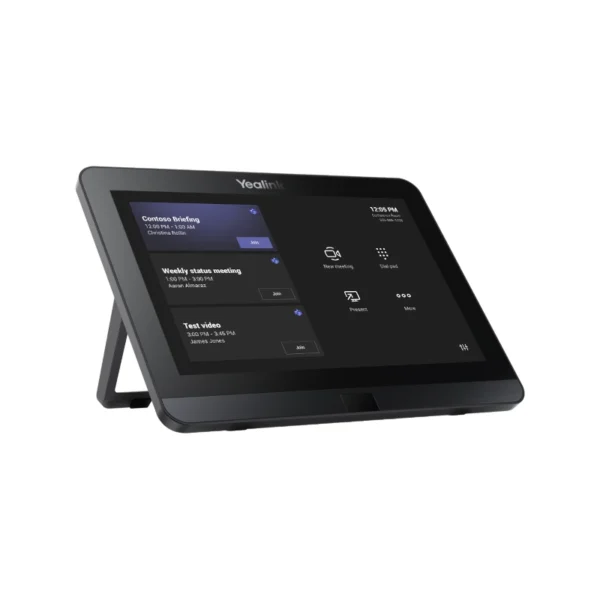

Yealink MTouch E2 8-Inch Touch Console for Microsoft Teams Rooms
The Yealink MTouch E2 is a dedicated touch-control solution for modern meeting rooms, giving businesses a simple and professional way to manage Microsoft Teams Rooms meetings. Rather than relying on a laptop or desktop for every meeting-room control, the MTouch E2 provides a purpose-built touchscreen interface positioned conveniently on the conference table.
With its 8-inch IPS display, 1280 × 800 resolution and 10-point capacitive touchscreen, the console is designed for straightforward operation in business environments. Users can start or join meetings, access meeting controls and interact with compatible Teams Rooms equipment directly from the touch interface. Yealink positions the MTouch E2 as part of its Microsoft Teams Rooms ecosystem, with compatibility across selected Yealink mini-PC and room-system configurations.
For South African organisations adopting hybrid work, this can be particularly useful in boardrooms, training rooms, meeting rooms and shared corporate spaces where different employees need to operate the conferencing system without extensive technical knowledge.
Key Features & Business-Class Highlights
8-Inch IPS Touchscreen
The MTouch E2 features an 8-inch IPS display with 1280 × 800 resolution, providing a clear interface for meeting-room controls. The IPS panel is well suited to shared meeting environments where users may view the console from different seating positions.
The 10-point capacitive touchscreen provides responsive touch interaction, making everyday meeting controls straightforward to access.
Designed for Microsoft Teams Rooms
The MTouch E2 is designed as a component within compatible Yealink Microsoft Teams Rooms solutions. This makes it particularly relevant to organisations standardising meeting-room technology around Microsoft Teams.
For companies managing multiple meeting spaces, using a dedicated room console can provide a more consistent user experience than having employees connect their own laptops for every meeting.
Human Motion Sensor
A built-in human motion sensor can detect activity around the console and help activate the device when someone approaches. Yealink describes this functionality as part of the MTouch experience, helping reduce unnecessary interaction before a meeting starts.
This is useful in corporate environments where meeting rooms are frequently shared throughout the day.
Adjustable Viewing Angle
The console includes an adjustable bracket, with Yealink documentation specifying an angle range of approximately 28° to 50° for the MTouch E2 on current MVC solutions.
This allows the display to be positioned for comfortable viewing depending on the conference-table layout.
Wired and Wireless Content Sharing
The MTouch E2 supports wired and wireless content sharing within compatible Yealink MVC configurations. Yealink documentation also lists HDMI/USB-C video input functionality for supported MTouch E2 deployments.
This can help teams present documents, spreadsheets, presentations and other business content during meetings without unnecessarily complicating the room setup.
Practical for South African Business Environments
For South African SMEs, larger organisations and hybrid teams, a dedicated meeting-room controller can help create a consistent conferencing experience across offices and shared spaces.
It can be particularly useful for:
- Boardrooms and executive meeting rooms
- Hybrid-work meeting spaces
- Training and presentation rooms
- Client-facing conference rooms
- Internal team collaboration spaces
- Microsoft Teams-based corporate environments
- Businesses deploying multiple compatible Yealink MVC systems
For organisations purchasing conferencing equipment in South Africa, compatibility is an important consideration. The MTouch E2 is not a standalone general-purpose tablet; it is a dedicated component intended for compatible Yealink room-system deployments. Yealink’s current documentation lists MTouch E2 compatibility with selected mini-PC configurations, including MCore Pro, MCore Lite and MCore 4.
Before ordering, businesses should therefore confirm compatibility with their existing or planned Yealink MVC equipment.
Built for Managed Meeting Rooms
The MTouch E2 fits into a broader Yealink room-management ecosystem. Current Yealink documentation includes the MTouch E2 among its supported Teams Rooms touch panels and provides firmware/version information for the device through Yealink RoomConnect.
This makes the console more appropriate for structured corporate deployments than using a consumer touchscreen device as a meeting-room controller.
For businesses already using Yealink business communication solutions, the MTouch E2 can form part of a broader conferencing environment. You can also browse our Video Conferencing & Collaboration category for compatible meeting-room equipment and accessories.
Professional Meeting Control Without the Complexity
One of the main advantages of a dedicated room console is usability. Employees should not need to understand the underlying PC, camera or conferencing hardware simply to start a meeting.
The MTouch E2 puts the meeting interface at the table, where users can access the room system directly. This is particularly useful for organisations with rotating employees, external visitors or meeting rooms used by multiple departments.
For South African companies operating across Johannesburg, Pretoria, Durban, Cape Town and other business centres, standardising meeting-room hardware can also simplify deployment and internal support. A consistent room-control interface means employees encounter the same basic operating concept across compatible rooms.
Compatibility Matters
The MTouch E2 should be purchased as part of a compatible Yealink deployment rather than treated as an independent tablet. Yealink’s compatibility documentation identifies the MTouch E2 as compatible with specific Yealink mini-PC and room-system configurations, while certain older Yealink products are not compatible.
For firmware, compatibility and technical documentation, refer to the official Yealink Support page.
Pros and Cons
Pros
- Dedicated 8-inch touch console for compatible Teams Rooms environments
- Clear 1280 × 800 IPS display
- Responsive 10-point capacitive touchscreen
- Built-in human motion sensor
- Adjustable viewing angle
- Supports wired and wireless content sharing in compatible configurations
- Purpose-built for professional meeting-room deployments
- Integrates into Yealink’s broader Microsoft Teams Rooms ecosystem
Cons
- Designed for compatible Yealink room systems rather than standalone tablet use
- 8-inch display is intended for meeting control rather than full desktop productivity
- Compatibility should be confirmed before purchasing
- Functionality depends on the connected Yealink room-system configuration
Complete Technical Specifications
| Specification | Details |
|---|---|
| Product | Yealink MTouch E2 |
| Product Type | Touch Console / Touch Panel |
| Series | Yealink MVC Series |
| Application | Microsoft Teams Rooms |
| Display Size | 8 inches |
| Display Type | IPS |
| Resolution | 1280 × 800 |
| Touchscreen | 10-point capacitive touchscreen |
| Human Motion Sensor | Yes |
| Viewing Angle | Adjustable, approximately 28°–50° |
| Audio Port | 3.5 mm headset jack |
| Content Sharing | Wired and wireless supported in compatible configurations |
| Video Input | HDMI / USB-C on supported configurations |
| Wireless Presentation | WPP30 supported |
| Compatible Mini-PCs | MCore Pro, MCore Lite, MCore 4 — depending on deployment |
| Room-System Use | Yealink MVC Series |
| Intended Environment | Meeting rooms, boardrooms, hybrid workspaces and corporate collaboration spaces |
| SKU | MTOUCH E2 |






Reviews
There are no reviews yet.