
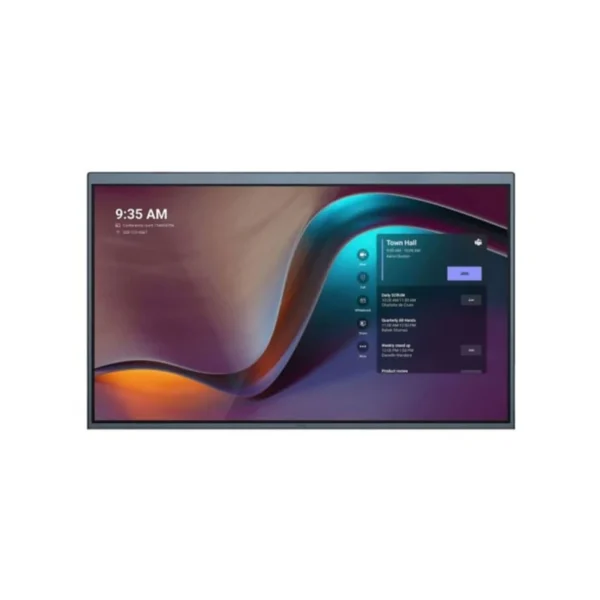

Yealink MeetingDisplay MD65 – Professional 65 Inch 4K Display for Modern Meeting Rooms
Upgrade your meeting room with the Yealink MeetingDisplay MD65, a purpose-built 65-inch professional display designed to work as part of a complete Yealink Microsoft Teams Rooms ecosystem.
Rather than treating the display as a standalone screen, the MeetingDisplay is designed to complement compatible Yealink meeting room hardware, including MTR Bars, UVC cameras and MCore systems. This makes it particularly suitable for organisations looking to create a consistent, professional meeting-room environment across offices, branches and boardrooms.
For South African businesses, hybrid working has made reliable meeting-room technology increasingly important. Teams meetings may involve colleagues working from Johannesburg, Cape Town, Durban or remotely from home, while customers and suppliers may join from anywhere in the country or internationally. A large, clear display helps participants view presentations, documents, shared content and meeting information comfortably from across the room.
The MD65 combines a 65-inch IPS panel, 3840 × 2160 4K resolution, 500-nit brightness and a 178-degree viewing angle. Yealink specifies a 60Hz refresh rate, 8ms grayscale response time and 1200:1 contrast ratio, providing a clear platform for business presentations and video conferencing content.
Key Features & Business-Class Highlights
65-Inch 4K IPS Display
The large 65-inch screen provides ample viewing space for boardrooms, conference rooms and collaborative workspaces. Its 4K Ultra HD resolution delivers 3840 × 2160 pixels, making presentation slides, spreadsheets, dashboards and other business content easy to view.
The IPS display provides a 178° horizontal and vertical viewing angle, helping participants see the content clearly even when seated away from the centre of the room. The anti-glare surface treatment is also suited to professional environments where overhead lighting and windows can create unwanted reflections.
Designed for Yealink MTR Environments
The MeetingDisplay is designed specifically around the Yealink MTR ecosystem. Compatible MTR equipment can be mounted directly to the display using the appropriate brackets, helping create a clean and coordinated installation.
This approach can reduce cable clutter and help businesses maintain a more professional-looking boardroom or meeting area. Compatible mounting options include brackets for selected Yealink MeetingBar and camera solutions, while the MCore bracket is included with the display. Additional mounting accessories are available separately depending on the installation configuration.
Businesses already using [Yealink products (brand link)] can therefore expand their existing meeting-room infrastructure while maintaining a consistent technology ecosystem.
Streamlined Installation
A key advantage of the MeetingDisplay design is its unified installation approach. Compatible Yealink MTR devices can be attached to the display using dedicated mounting hardware rather than requiring every component to be separately positioned around the room.
For businesses managing office fit-outs, this can help create a cleaner installation with fewer visible components. Wall-mounted and floor-standing installation options are supported, allowing the display to be configured according to the room layout.
For organisations planning a complete [Meeting Room Displays category link], the MD65 provides a strong foundation around which a complete conferencing environment can be configured.
Digital Signage Capability
When the meeting room is not being used for conferencing, the MeetingDisplay can also support digital signage functionality.
This provides businesses with an additional use for the large-format display. Instead of remaining inactive between meetings, the screen can be used for corporate announcements, welcome messages, internal communications, branding or other digital content, depending on the deployed system and configuration.
Centralised Device Management
Managing meeting-room technology across multiple locations can become challenging as a business grows. Yealink supports centralised management through YMCS/YDMP, allowing compatible MeetingDisplay and MTR equipment to be deployed, monitored and managed through a unified management environment.
This can be particularly useful for South African organisations with multiple branches or meeting spaces. An IT administrator can work towards maintaining consistent configurations and monitoring device status without treating every meeting room as an entirely separate installation.
Automatic Coordination
The MeetingDisplay and compatible MTR equipment can work together to coordinate functions such as sleep/wake behaviour and power on/off. Digital signage functionality can also be incorporated when the meeting room is not actively being used.
This coordinated approach is useful for businesses that want meeting rooms to be simple for employees to use. Instead of requiring staff to manage multiple devices independently before every meeting, the integrated ecosystem is designed to reduce unnecessary interaction with individual components.
Wireless and Wired Content Sharing
The MD65 supports wired content sharing through HDMI and wireless presentation options including AirPlay and Miracast. This gives employees flexibility when sharing presentations, documents and other content from compatible devices.
For a hybrid meeting, this flexibility can be useful when participants need to quickly present content without spending time troubleshooting complicated connections.
The display also includes three HDMI 2.1 inputs, two USB-A 2.0 ports, one USB-B 2.0 port, two Gigabit Ethernet ports, RS232 control and IP control via LAN.
Built for Professional Meeting Spaces
The MD65 is specified for 7 × 18-hour operation, making it appropriate for demanding professional environments where meeting rooms may be used throughout the working day. It includes integrated 12W × 2 speakers and supports Wi-Fi 6 and Bluetooth 5.1 connectivity.
Its 65-inch size offers a practical balance between screen visibility and room footprint, making it suitable for many medium-to-large conference rooms without moving into the physical scale of the 75-inch or 86-inch models.
A Practical Solution for South African Businesses
For South African SMEs, professional services firms, corporate offices, training providers and organisations operating hybrid teams, meeting-room technology needs to be straightforward, reliable and easy for employees to use.
The Yealink MeetingDisplay MD65 provides a central visual platform for meetings while integrating with compatible Yealink conferencing hardware. It can be particularly useful in executive boardrooms, collaborative meeting rooms, training environments, client presentation spaces and shared corporate offices.
The display can also help standardise meeting-room deployments. Instead of selecting unrelated displays, cameras and conferencing equipment for each room, businesses can build around the Yealink ecosystem and manage compatible equipment through the available management platforms.
For larger deployments, businesses should consider the required mounting accessories, compatible MTR hardware, network infrastructure and room layout before installation.
For product documentation, firmware and technical assistance, see the Official Yealink Support Page.
Pros and Cons
Pros
- Large 65-inch 4K IPS display suited to professional meeting rooms.
- 3840 × 2160 Ultra HD resolution for detailed presentations and shared content.
- Designed to integrate with compatible Yealink MTR systems.
- Supports AirPlay and Miracast wireless content sharing.
- Three HDMI 2.1 inputs provide useful connectivity flexibility.
- Wi-Fi 6 and Bluetooth 5.1 support.
- Integrated 12W × 2 speakers.
- Supports digital signage functionality when not being used for meetings.
- Centralised management through compatible YMCS/YDMP platforms.
- Wall-mounted and floor-standing installation options.
- Coordinated sleep/wake and power functions with compatible MTR devices.
Cons
- The MD65 is a large professional display and requires appropriate room space.
- Some mounting brackets and accessories are purchased separately.
- Full MTR functionality requires compatible Yealink conferencing hardware.
- At 65 inches, the display may be excessive for small huddle rooms where a smaller screen would be sufficient.
- Professional installation should be planned around the display’s dimensions, mounting requirements and room infrastructure.
- The display is designed as part of a professional meeting-room ecosystem rather than as a conventional consumer TV replacement.
Complete Technical Specifications
| Specification | Yealink MeetingDisplay MD65 |
|---|---|
| Product Model | MeetingDisplay 65 / MD65 |
| Screen Size | 65 inches |
| Display Type | IPS |
| Resolution | 3840 × 2160 |
| Aspect Ratio | 16:9 |
| Refresh Rate | 60 Hz |
| Brightness | 500 cd/m² / nits |
| Contrast Ratio | 1200:1 |
| Response Time | 8 ms grayscale |
| Colour Gamut | 72% NTSC |
| Colour Depth | 1.07G / 10-bit |
| Viewing Angle | 178° H / 178° V |
| Surface Treatment | Anti-glare coating |
| Haze | 25% |
| Operating Time | 7 × 18 hours |
| Speakers | 12W × 2 |
| Wired Content Sharing | HDMI In |
| Wireless Content Sharing | AirPlay, Miracast |
| HDMI Inputs | 3 × HDMI 2.1 |
| USB | 2 × USB-A 2.0, 1 × USB-B 2.0 |
| Audio Output | 3.5mm stereo mini jack |
| Network | 2 × RJ45 10/100/1000M |
| Control | RS232, IP Control via LAN |
| Wireless LAN | Wi-Fi 6, 2.4GHz & 5GHz |
| Wi-Fi Standard | 802.11a/b/g/n/ac/ax |
| Bluetooth | Bluetooth 5.1 |
| Operating System | Android 13 |
| Memory | 4GB |
| Flash Storage | 32GB |
| Installation | Wall-mounted or floor-standing |
| VESA | 400 × 400 mm |
| VESA Screw | M8 |
| Dimensions (W × D × H) | 1456 × 58 × 834 mm |
| In-Wall Depth with MD-WallMount | 94 mm |
| Net Weight | 19.9 kg |
| Gross Weight | 28.2 kg |
| Included MCore Bracket | Yes, compatible with MCore 4 |
| Warranty | 3 years |
| SKU | MD65 |





Reviews
There are no reviews yet.