
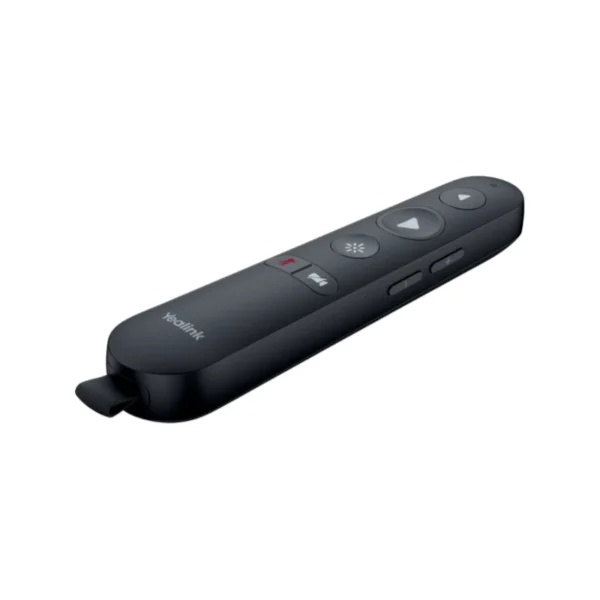

Yealink MB-Remote Wireless Presentation Remote for MeetingBoard
Keep presentations moving without having to remain next to the MeetingBoard. The Yealink MB-Remote is a dedicated wireless remote controller designed specifically for the Yealink MeetingBoard series and MeetingBoard Pro, giving presenters convenient control over meeting and presentation functions from around the room.
For South African businesses using modern meeting rooms, hybrid collaboration and video conferencing, small accessories like a dedicated presentation remote can make a noticeable difference to the way meetings are run. Instead of repeatedly walking back to the MeetingBoard to advance slides or adjust meeting controls, presenters can remain engaged with the audience while operating the system remotely.
The MB-Remote is particularly suited to boardrooms, training rooms, executive meeting spaces, client presentation rooms and hybrid-work environments where presentations need to move smoothly between speakers, slides and meeting controls.
Key Features & Business-Class Highlights
Designed for Yealink MeetingBoard
The MB-Remote is specifically designed for use with Yealink MeetingBoard and MeetingBoard Pro systems. This makes it a practical accessory for organisations that have standardised their meeting rooms around Yealink conferencing equipment.
If your business is building a complete Yealink meeting-room setup, you can also explore our [Yealink](brand link) range for compatible conferencing hardware and accessories.
Wireless Presentation Control
The remote is designed to give presenters control without being physically tied to the MeetingBoard. Yealink highlights multimedia page-turning, allowing presenters to move through presentation content naturally while maintaining their position in the room.
This is useful for sales presentations, internal meetings, training sessions, demonstrations and executive briefings where the presenter may need to move around rather than stand beside the display.
Air Mouse Functionality
The integrated air mouse function provides another method of interacting with supported content. Instead of relying solely on the MeetingBoard’s touchscreen, presenters can use the handheld controller for convenient on-screen interaction.
This can be especially useful during demonstrations where the presenter needs to point to, select or navigate between different elements of content.
Convenient Meeting Controls
The MB-Remote is designed to provide various meeting control functions. Product specifications also identify controls for microphone mute/unmute, speaker volume adjustment, camera on/off and presentation pointer functionality.
These controls can reduce interruptions during meetings and help presenters manage common functions without returning to the main conference-room display.
Plug-and-Play Setup
One of the biggest practical advantages for business environments is the straightforward setup. The USB receiver and MB-Remote are paired at the factory, so users do not need to go through a separate pairing process. Simply connect the receiver to the host device and use the remote.
For corporate IT departments managing multiple meeting rooms, this helps keep accessory deployment simple and reduces the amount of setup required for everyday users.
Ready for the Boardroom
The package includes the MB-Remote, USB dongle, protective velvet bag, quick-start guide and two AAA batteries, providing the essential accessories needed to get started.
The supplied protective cover is also useful for businesses where meeting-room accessories are regularly moved between rooms or stored between presentations.
Practical Benefits for South African Businesses
For South African SMEs and corporate environments, meeting-room technology needs to be straightforward and dependable. A presentation remote may be a small addition to a conferencing setup, but it can improve the practical usability of a shared MeetingBoard.
In a client-facing environment, the presenter can move around the room instead of staying beside the display. During training sessions, facilitators can move closer to participants while continuing to control the presentation. In boardrooms, executives can maintain the flow of a discussion without interrupting the meeting to operate the main screen.
It can also be useful for hybrid meetings where the presenter needs to switch between presentation content and meeting functions. Having physical controls available from a handheld device can make those transitions more convenient.
For businesses expanding their conferencing infrastructure, the MB-Remote can form part of a broader [Meeting Room Accessories category link], alongside compatible displays, cameras, microphones and collaboration equipment.
Simple Deployment for IT Teams
The factory-paired receiver is particularly relevant in business environments where IT teams need to deploy accessories with minimal configuration. Yealink’s official product information confirms that the receiver and remote are paired in advance and are intended to work simply by plugging the receiver into the host.
Compatibility should nevertheless be checked against the specific MeetingBoard model and software/firmware environment before purchasing larger quantities for a corporate rollout.
For product documentation, software information and manufacturer resources, refer to the official Yealink Support page.
Ideal For
- Corporate boardrooms
- Hybrid meeting rooms
- SME meeting spaces
- Training and presentation rooms
- Sales demonstrations
- Client presentations
- Executive briefing rooms
- Yealink MeetingBoard deployments
- Yealink MeetingBoard Pro environments
Warranty & Support
Yealink documentation and reseller listings show warranty/support options for the MB-Remote, including a 2-year hardware warranty in product listings. Warranty terms can vary by distributor, region and service arrangement, so the applicable South African warranty terms should be confirmed with the reseller at purchase.
Yealink also lists MB-Remote within its compatible accessory and PrimeCare ecosystem, indicating that the accessory can be included in applicable Yealink service arrangements.
Pros and Cons
Pros
- Dedicated remote control for Yealink MeetingBoard environments
- Designed specifically for MeetingBoard and MeetingBoard Pro
- Factory-paired USB receiver simplifies installation
- Multimedia page-turning supports smoother presentations
- Air mouse functionality provides additional navigation control
- Supports practical meeting controls such as mute, volume and camera functions
- Includes two AAA batteries
- Protective storage cover included
- Useful for boardrooms, training rooms and hybrid-work environments
- Compact accessory that can improve presenter mobility
Cons
- Designed primarily for the Yealink MeetingBoard ecosystem rather than as a universal presentation remote
- Requires a compatible Yealink host device
- Does not replace a full wireless presentation system or conferencing platform
- Some camera-control functionality may depend on the MeetingBoard operating mode and supported configuration
- Batteries require periodic replacement
Overall, the Yealink MB-Remote is a practical meeting-room accessory for organisations already using compatible Yealink MeetingBoard equipment. Its focus is straightforward: give presenters convenient wireless control over presentations and common meeting functions while keeping setup simple.
| Specification | Details |
|---|---|
| Brand | Yealink |
| Model | MB-Remote |
| SKU | MB-REMOTE |
| Part Number | 1303133 |
| Product Type | Wireless presentation remote / meeting-room remote controller |
| Designed For | Yealink MeetingBoard and MeetingBoard Pro |
| Presentation Control | Multimedia page turning |
| Air Mouse | Yes |
| Presentation Pointer | Yes |
| Microphone Control | Mute / unmute |
| Speaker Control | Volume + / − |
| Camera Control | Camera on / off |
| Wireless Receiver | USB dongle |
| Receiver Pairing | Factory-paired with remote |
| Setup | Plug-and-play |
| Power | 2 × AAA batteries |
| Included Accessories | MB-Remote, USB dongle, protective velvet bag, quick-start guide, 2 × AAA batteries |
| Manufacturer | Yealink |
| Warranty | 2-year hardware warranty where applicable; confirm local reseller terms |






Reviews
There are no reviews yet.