
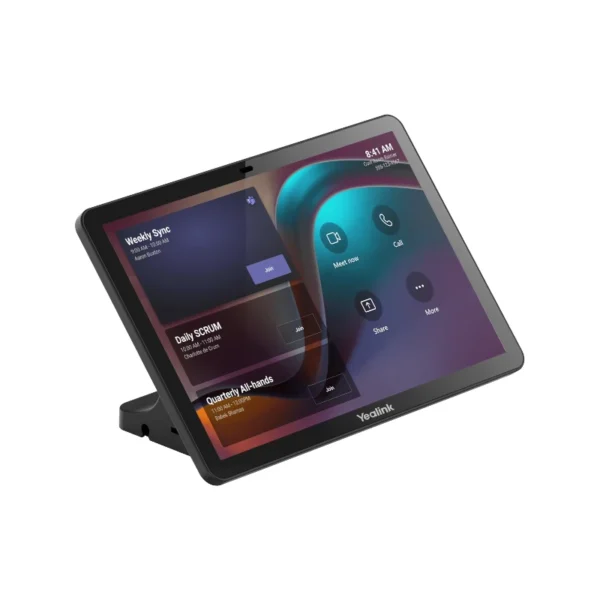

Yealink CTP25 Touch Console for Smarter Meeting Control
The Yealink CTP25 Touch Console is designed to make meeting-room control straightforward, professional and accessible. Built around a responsive 10.1-inch IPS touchscreen, the CTP25 provides a dedicated interface for managing compatible Yealink meeting systems without relying on a separate laptop for everyday room controls.
For South African businesses embracing hybrid work, this type of dedicated meeting-room console can help create a more consistent experience across boardrooms, huddle rooms, training rooms and shared collaboration spaces. Instead of requiring users to navigate complicated conferencing hardware, the CTP25 places essential meeting controls directly at the table.
The CTP25 is particularly suited to environments using the Yealink MeetingBar A40, with Yealink documenting direct wired connectivity between the A40 and CTP25. The console can therefore form part of a streamlined meeting-room deployment where the touch interface provides the control point while the MeetingBar handles the conferencing experience.
Key Features & Business-Class Highlights
10.1-inch IPS touchscreen
The CTP25 features a 10.1-inch IPS display with a 1280 × 800 resolution, 350 cd/m² typical brightness and a 1000:1 contrast ratio. Its 178° horizontal and vertical viewing angles help make the interface visible to users sitting around a meeting table. The display also features anti-glare and anti-fingerprint characteristics for practical everyday business use.
For busy corporate meeting rooms, this means users can interact directly with the console rather than having to stand up or reach across the table to operate equipment.
Simple meeting management
The CTP25 is purpose-built for meeting control. Users can join and manage compatible meetings through the touchscreen interface, helping reduce the friction associated with starting a video conference.
This is useful for South African SMEs that want meeting rooms to be easy for different employees, clients and visitors to use. It can also help larger organisations maintain a more consistent room setup across multiple offices.
USB-C content sharing and BYOD
One of the CTP25’s practical features is its USB-C connectivity. Yealink specifies support for wired content sharing, BYOD and power, with the USB-C connection supporting 4K content sharing and wired BYOD. The system can also provide up to 45 W PD 2.0 laptop charging, with up to 60 W possible through the appropriate adapter configuration.
For hybrid professionals moving between office desks, meeting rooms and remote locations, BYOD support can be particularly useful. Employees can connect their own compatible laptop when they need to present or collaborate without introducing unnecessary wireless complexity.
Wi-Fi 6 and Bluetooth 5.0
The CTP25 supports Wi-Fi 6 802.11a/b/g/n/ac/ax and Bluetooth 5.0.
For businesses upgrading their networking infrastructure, Wi-Fi 6 provides a modern wireless platform for supported deployments. Bluetooth 5.0 also adds flexibility when integrating compatible peripherals and devices.
PoE support for cleaner installations
The CTP25 includes an RJ45 Ethernet port with IEEE 802.3af PoE support, allowing compatible installations to provide power through the network connection.
This can be particularly useful for professional boardrooms and corporate meeting spaces where reducing cable clutter matters. A structured installation can help keep meeting tables cleaner while simplifying power and network management.
Android 13 platform
The console runs Android 13, with Yealink stating that the platform will continue to receive updates. The CTP25 also supports MDEP and can be managed through Yealink’s management ecosystem, including the Yealink Web Portal, Yealink Device Management Platform, Microsoft Teams Admin Center and Zoom Device Management.
For IT administrators managing several meeting rooms, centralised management can be valuable. Rather than treating each console as an isolated device, compatible management platforms can help organisations administer conferencing hardware across their environment.
Flexible installation options
The CTP25 can be placed on a table, mounted on a table or installed on a wall. The supplied high stand provides a standard deployment option, while optional mounting solutions include a rotatable desktop mount and wall mount.
This flexibility makes the CTP25 suitable for different room layouts, from compact SME meeting spaces to larger corporate boardrooms.
Designed for South African Business Environments
South African businesses increasingly operate across a mixture of office-based, hybrid and remote teams. Meeting rooms therefore need to accommodate internal meetings, customer presentations, interviews, training sessions and online collaboration.
The CTP25 is well suited to this environment because it is designed around a dedicated meeting-control experience rather than general-purpose computing. A user arriving at a meeting room can interact directly with the room system through the touchscreen.
For SMEs, this can provide a professional meeting-room setup without unnecessarily complicated controls. For larger organisations, its support for network management and multiple installation methods can help IT teams standardise compatible meeting-room deployments.
The CTP25 can also complement a broader Yealink product range and can be positioned alongside other video conferencing and meeting-room solutions when building a complete collaboration environment.
Connectivity and Deployment
The physical interface includes one USB-A port, two USB-C ports and one RJ45 Ethernet port, alongside a reset hole and motion sensor. The RJ45 interface supports PoE, while the USB-C ports support the console’s content-sharing, BYOD and power-related functions.
Power consumption is specified at approximately 5 W in standby, 7.3 W average and 15.2 W peak, while the supplied power adapter is rated at 65 W PD.
The compact console measures approximately 242.95 × 27.50 × 161.95 mm and weighs approximately 0.683 kg, making it practical for meeting tables where desk space is limited.
For firmware, documentation and product resources, refer to the [official vendor support page] or Yealink CTP25 Support.
Pros and Cons
Pros
- 10.1-inch IPS touchscreen provides a dedicated meeting-control interface.
- Designed to integrate with Yealink MeetingBar systems, including the A40.
- USB-C supports wired content sharing, BYOD and laptop power functions.
- Wi-Fi 6 and Bluetooth 5.0 provide modern wireless connectivity.
- PoE support can simplify professional meeting-room installations.
- Android 13 provides a modern platform with ongoing update support.
- Supports management through Yealink and compatible Teams and Zoom management platforms.
- Multiple mounting options suit different boardroom and meeting-room layouts.
- Compact footprint is suitable for professional meeting tables.
Cons
- The CTP25 is primarily a meeting-room control console, not a standalone laptop or general-purpose desktop computer.
- Its 1280 × 800 resolution is designed for control and conferencing interfaces rather than high-resolution content production.
- Some advanced functionality depends on compatibility with the connected Yealink meeting-room system.
- Optional mounting accessories may be required depending on the desired installation.
- Warranty information was not included in the supplied product data and should be confirmed before purchase.
Complete Technical Specifications
| Specification | Details |
|---|---|
| Product | Yealink CTP25 Touch Console |
| Model | CTP25 |
| Primary Use | Meeting control / conference-room touch console |
| Operating System | Android 13.0 |
| Display Size | 10.1 inches |
| Display Type | IPS |
| Resolution | 1280 × 800 |
| Contrast Ratio | 1000:1 |
| Brightness | 350 cd/m² typical |
| Viewing Angle | 178° horizontal / 178° vertical |
| Touch | Multi-point capacitive touch |
| Display Features | Anti-glare, anti-fingerprint |
| Audio | Built-in ultrasound unit |
| Wireless | Wi-Fi 6 802.11a/b/g/n/ac/ax |
| Bluetooth | Bluetooth 5.0 |
| Network Features | VLAN, 802.1P/Q, DiffServ, 802.1X, LLDP-MED, HTTPS |
| Device Management | Yealink Web Portal, Yealink Device Management Platform, Teams Admin Center, Zoom Device Management |
| USB-A | 1 × USB-A |
| USB-C | 2 × USB-C |
| Ethernet | 1 × RJ45 |
| PoE | IEEE 802.3af and above |
| Other | Reset hole, motion sensor |
| Content Sharing | USB-C wired content sharing |
| BYOD | Wired BYOD via USB-C |
| Laptop Charging | Up to 45 W PD2.0; up to 60 W with appropriate adapter configuration |
| Installation | Table placement, table mounting, wall mounting |
| Standard Mount | High stand |
| Optional Mount | Rotatable desktop mount, wall mount |
| Desktop Mount Rotation | 90° left and 90° right |
| Operating Temperature | -10°C to +45°C |
| Storage Temperature | -30°C to +70°C |
| Standby Power | 5 W |
| Average Power | 7.3 W |
| Peak Power | 15.2 W |
| Power Adapter | 65 W PD |
| CTP25 Dimensions | 242.95 × 27.50 × 161.95 mm |
| CTP25 Weight | 0.683 kg |
| Box Dimensions | 286 × 198 × 140 mm |
| Box Net Weight | 1.578 kg |
| Box Gross Weight | 1.846 kg |
| Carton Dimensions | 725 × 410 × 300 mm |
| Carton Net Weight | 18.478 kg |
| Carton Gross Weight | 19.798 kg |
| Carton Quantity | 10 units |
| Included Accessories | 7.5 m Ethernet cable, 1.8 m USB-C cable, 65 W PD power adapter, screwdriver, high stand, cable-management cover, M3 screws ×10, cable ties ×5, quick-start guide |





Reviews
There are no reviews yet.