

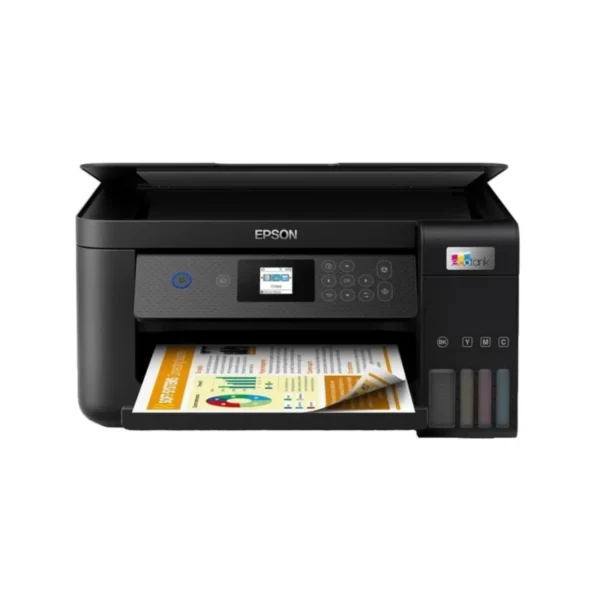


Epson EcoTank L4360 – Smart, Cost-Effective Printing for Modern Workspaces
The Epson EcoTank L4360 is built for professionals, entrepreneurs, home offices and small businesses that need dependable everyday printing without the ongoing expense and inconvenience associated with conventional ink cartridges. As a 3-in-1 multifunction printer, it combines printing, scanning and copying in a compact A4 unit, making it a practical addition to a home office, small business, consulting practice, classroom or shared workspace.
For South African hybrid professionals, the L4360 offers the flexibility needed when working between home and office environments. Its Wi-Fi and Wi-Fi Direct connectivity allows compatible devices to connect wirelessly, reducing cable clutter and making it easier to print from laptops, smartphones and other supported devices. Epson also supports mobile printing through services including Epson Smart Panel, Epson Connect, Apple AirPrint and Mopria, depending on device and operating-system compatibility.
The printer is particularly suited to users who regularly produce business documents, quotations, invoices, reports, presentations, forms and colour marketing material. Its automatic duplex function can print on both sides of compatible paper, helping businesses reduce paper consumption while keeping multi-page documents neat and professional.
Key Features & Business-Class Highlights
High-yield EcoTank printing
The L4360 uses Epson’s refillable ink-tank system rather than conventional disposable cartridges. Epson South Africa lists an included black yield of up to 15,100 pages and colour yield of up to 5,500 pages for this South African configuration, based on Epson’s stated methodology and conditions.
This high-yield approach can be particularly useful for SMEs and professionals who print regularly. Instead of repeatedly purchasing individual cartridges, users refill the integrated tanks using dedicated ink bottles. Epson’s key-lock bottle system is designed to make refilling simpler and help prevent incorrect colour filling.
Print, scan and copy in one compact device
The L4360 consolidates three everyday office functions into a single machine. The integrated flatbed scanner uses a CIS sensor and provides hardware scanning resolution of up to 1,200 × 2,400 dpi, making it suitable for digitising documents, receipts, forms and other office material.
Automatic double-sided printing
Automatic duplex printing is useful when producing contracts, reports, proposals, training material and other multi-page documents. Epson rates duplex printing at up to 6.5 pages per minute in monochrome and 4.5 pages per minute in colour under ISO/IEC 24734 testing.
PrecisionCore print technology
Epson’s PrecisionCore printhead provides a maximum print resolution of 4,800 × 1,200 dpi and uses a combination of pigment black and dye colour inks. The printer features 400 black nozzles and 128 nozzles per colour.
For everyday office printing, Epson specifies ISO speeds of up to 15 pages per minute in monochrome and 8 pages per minute in colour. Draft-mode speeds can reach up to 33 ppm monochrome and 20 ppm colour on plain paper, making the printer well suited to quick internal document production as well as more polished colour output.
Wireless connectivity for hybrid work
The L4360 supports Wi-Fi, Wi-Fi Direct and USB connectivity. This gives businesses several ways to integrate the printer into a workspace, whether it is being used by a single professional or shared across compatible devices. Supported mobile and cloud-printing options include Apple AirPrint, Epson Connect and Epson Smart Panel.
Businesses looking to expand their printing setup can also browse our [Epson](brand link) range alongside our [Ink Tank Printers](category link) category for compatible alternatives and related solutions.
Compact footprint for South African offices
Measuring approximately 375 × 347 × 187 mm, the L4360 has a relatively compact footprint for a multifunction printer. Its 5.2 kg weight makes it manageable for home-office desks, reception areas and smaller workspaces.
The printer includes a 100-sheet standard paper tray and supports a range of media formats including A4, A5, A6, B5, envelopes, Letter, Legal and selected photo sizes. Borderless printing is also supported up to A4, depending on the selected media and print settings.
Practical Choice for SMEs and Hybrid Professionals
For South African SMEs, controlling operating costs is an important consideration when selecting office equipment. The L4360’s refillable tank design is aimed at reducing the frequency of consumable replacement, while automatic duplex printing can help reduce paper usage.
It can also support a wide variety of everyday business workflows. A property professional can print agreements and inspection documents, a recruitment consultant can produce candidate packs and interview documentation, while a small retailer can print invoices, quotations and promotional material. Hybrid employees can scan paperwork, make copies and print documents without requiring separate devices.
The printer’s colour LCD panel provides a straightforward interface for everyday operation, while the integrated scanner and copier reduce the need for additional office hardware. Epson also provides product drivers, manuals, FAQs and setup resources through its official support ecosystem.
For drivers, manuals, troubleshooting and product assistance, visit the [official Epson L4360 Support page](vendor support link).
Warranty & Reliability
The Epson South Africa listing specifies a 12-month carry-in warranty, with warranty coverage also stated at up to 50,000 pages. Warranty conditions and exclusions should be confirmed with the supplying retailer and Epson for the specific South African unit purchased.
As with any inkjet printer, actual page yields can vary according to document coverage, print settings, paper type, frequency of printing and environmental conditions. Epson specifically notes that quoted yields are based on its stated testing methodology and should not be interpreted as a guaranteed real-world page count for every user.
Pros and Cons
Pros
- Excellent multifunction versatility with print, scan and copy functionality.
- Refillable EcoTank design helps reduce dependence on traditional ink cartridges.
- High stated ink yields for regular home and small-business printing.
- Automatic duplex printing supports more efficient two-sided document production.
- Wi-Fi and Wi-Fi Direct provide convenient wireless connectivity.
- Supports mobile printing through compatible Epson and third-party services.
- Up to 4,800 × 1,200 dpi print resolution.
- Compact footprint suitable for home offices and smaller workspaces.
- 100-sheet paper capacity for everyday document workloads.
- 12-month carry-in warranty for the South African configuration.
Cons
- No automatic document feeder, so multi-page scanning and copying must be handled manually.
- Duplex printing is slower than the printer’s simplex draft-mode speeds.
- A 100-sheet paper tray is more suited to home offices and small workloads than high-volume corporate print rooms.
- Actual ink yields vary according to coverage, print settings and usage conditions.
- The printer is better suited to everyday SME and professional workloads than intensive departmental print volumes.
Complete Technical Specifications
| Specification | Epson EcoTank L4360 |
|---|---|
| Product Type | A4 Colour Multifunction Ink Tank Printer |
| Functions | Print, Scan, Copy |
| Printing Technology | Epson PrecisionCore™ Print Head |
| Ink Technology | Pigment Black + Dye Colour Inks |
| Number of Colours | 4 Colour |
| Maximum Print Resolution | 4,800 × 1,200 dpi |
| Black Nozzles | 400 |
| Colour Nozzles | 128 per colour |
| Minimum Droplet Size | 3.3 pl |
| ISO Print Speed – Mono | Up to 15 pages/min |
| ISO Print Speed – Colour | Up to 8 pages/min |
| Draft Print Speed – Mono | Up to 33 ppm |
| Draft Print Speed – Colour | Up to 20 ppm |
| Duplex Speed – Mono | Up to 6.5 pages/min |
| Duplex Speed – Colour | Up to 4.5 pages/min |
| Automatic Duplex | Yes |
| Scanner Type | Contact Image Sensor (CIS) |
| Scanner Type | Colour Flatbed |
| Optical/Hardware Scan Resolution | Up to 1,200 × 2,400 dpi |
| Maximum Hardware Resolution | 2,400 dpi |
| Interpolated Scan Resolution | Up to 9,600 dpi |
| Scan Bit Depth | 48-bit colour input / 24-bit colour output |
| Maximum Scan Area | 216 × 297 mm |
| Automatic Document Feeder | No |
| Paper Tray Capacity | 100 sheets |
| Output Tray Capacity | 30 sheets |
| Paper Tray | 1 |
| Supported Media | A4, A5, A6, B5, B6, Letter, Legal, envelopes and selected photo sizes |
| Borderless Printing | Yes, up to A4 |
| Wi-Fi | Yes |
| Wi-Fi Direct | Yes |
| USB | Yes |
| Mobile Printing | Epson Smart Panel, Epson Connect, Apple AirPrint, Mopria |
| Operating Systems | Windows, Windows Server, macOS and ChromeOS compatibility varies by version |
| LCD Display | 3.7 cm colour LCD |
| Black Ink Yield | Up to 15,100 pages* |
| Colour Ink Yield | Up to 5,500 pages* |
| Ink Bottles | 1 × Black 127 ml; 3 × Colour 70 ml |
| Maintenance Box | User-replaceable |
| Product Dimensions | 375 × 347 × 187 mm |
| Weight | Approx. 5.2 kg |
| Power Supply | 220–240 V |
| Sleep Power Consumption | Approx. 6.2 W |
| Printing Power Consumption | Approx. 0.1 W listed by Epson South Africa |
| Warranty | 12-month carry-in |
| Warranty Page Coverage | Up to 50,000 pages |
| Product Colour | Black |





Reviews
There are no reviews yet.