
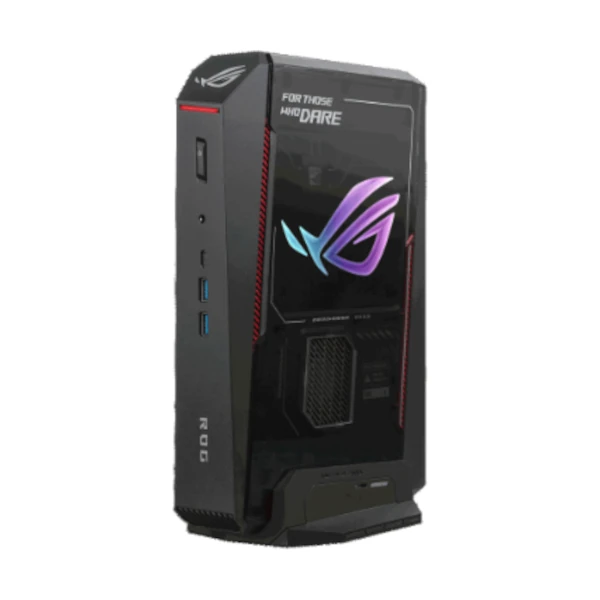
ASUS ROG NUC 16 Mini PC – Compact Power Without Compromise
When desk space is valuable but performance cannot be compromised, the ASUS ROG NUC 16 delivers a powerful alternative to a traditional full-size desktop. Designed around high-performance computing hardware in a compact Mini PC chassis, this configuration combines an Intel Core Ultra 9 290HX processor, NVIDIA GeForce RTX 5080 Laptop GPU with 16GB GDDR7, 32GB DDR5-6400 memory and a fast 2TB PCIe 4.0 NVMe SSD.
For South African professionals working in hybrid environments, this compact form factor can be particularly useful. Whether it is positioned at a home-office workstation in Johannesburg, a creative studio in Cape Town, or a corporate desk in Durban, the ROG NUC 16 provides substantial computing capability without taking up the space of a conventional tower PC.
Its performance profile makes it suitable for demanding productivity and professional workloads, including advanced multitasking, creative applications, 3D work, graphics-intensive software, data processing and AI-assisted workflows. The RTX 5080 Laptop GPU also provides a substantial graphics engine for users who need more than integrated graphics can deliver.
Key Features & Business-Class Highlights
Intel Core Ultra 9 Processing Power
At the heart of the ROG NUC 16 is the Intel Core Ultra 9 290HX, configured with a 45–160W cTDP according to ASUS. This high-performance processor is designed for demanding workloads where fast processing and responsive multitasking are important.
For business users, this means you can work across multiple applications without relying on a large desktop tower. Professionals handling spreadsheets, browser-based applications, communications platforms, creative software and other resource-intensive workloads can benefit from the system’s high-performance CPU architecture.
NVIDIA GeForce RTX 5080 Graphics
The dedicated NVIDIA GeForce RTX 5080 Laptop GPU with 16GB GDDR7 gives the ROG NUC 16 a major advantage for graphics-intensive workloads.
This makes the system particularly relevant to:
- Graphic designers and digital creatives
- Video editors and content creators
- 3D designers and visualisation professionals
- Architects and engineering users
- Developers working with GPU-accelerated applications
- AI and machine-learning workflows
- Professionals who also want a high-performance gaming system
The dedicated GPU also makes the ROG NUC 16 considerably more versatile than conventional office-focused Mini PCs.
32GB High-Speed DDR5 Memory
This configuration includes 32GB of DDR5-6400 CSO-DIMM memory, supplied as two 16GB modules.
For hybrid professionals, 32GB provides a strong foundation for demanding multitasking. You can keep numerous browser tabs, productivity applications, communication tools and professional software running simultaneously without having to immediately move to a workstation-class tower.
ASUS specifies two memory slots, while the supported maximum varies by configuration and specification listing. Buyers should confirm the upgrade capacity with their reseller before purchasing additional modules.
Fast 2TB NVMe Storage
The included 2TB M.2 2280 PCIe 4.0 NVMe SSD provides substantial high-speed storage for applications, documents, creative projects and business files. ASUS also specifies support for PCIe 4.0 x4 and PCIe 5.0 x4 M.2 storage configurations.
For South African businesses, 2TB can provide useful working capacity without immediately requiring an external storage solution. However, businesses handling large video libraries, extensive datasets or centralised corporate archives should still consider a dedicated NAS or server-based storage strategy.
Wi-Fi 7 and 2.5Gb Ethernet
The ROG NUC 16 supports Intel Killer Wi-Fi 7 BE1750x and Bluetooth 5.4, while wired networking is provided through a 2.5 Gigabit Ethernet connection.
This is especially useful for modern hybrid workplaces where fast wireless connectivity is increasingly important. Where compatible networking infrastructure is available, the combination of Wi-Fi 7 and 2.5GbE provides flexibility for both wireless and wired deployments.
For businesses operating on fibre connectivity, a wired 2.5GbE connection can also provide a reliable high-speed link to compatible network equipment.
Extensive Display and Connectivity Options
Despite its compact footprint, the ROG NUC 16 offers an impressive selection of ports. The rear panel includes Thunderbolt 4 with DisplayPort 2.1, four USB 3.2 Gen 2 Type-A ports, two HDMI 2.1 FRL ports, two DisplayPort 2.1 outputs, RJ45 LAN, DC input and a Kensington Lock. The front provides two additional USB Type-A ports, USB Type-C and a 3.5mm combo audio jack.
This makes the system practical for multi-display business environments, creative workstations and specialised professional setups.
Compact Office-Friendly Design
Measuring approximately 282.5 x 189.5 x 56.5 mm and weighing around 3.2 kg, the ROG NUC 16 takes significantly less desk space than a traditional performance desktop.
For hybrid workers who alternate between home and office environments, the compact chassis can make workstation setup and relocation easier. It can also be useful for businesses looking to maximise desk space while retaining powerful computing capability.
Windows 11 Home
The system comes with Windows 11 Home, providing a familiar modern Windows environment for everyday productivity, creative applications and personal use.
For corporate deployments requiring Windows 11 Pro-specific features, IT administrators should confirm the required licensing and operating-system edition before deployment.
Built for South African Hybrid Professionals and SMEs
The ASUS ROG NUC 16 occupies an interesting position between a conventional business PC and a high-performance workstation. For an SME, it can provide a powerful workstation for a designer, developer, architect, content creator or technical professional without requiring a large tower chassis.
For hybrid employees, its compact footprint is convenient for modern home-office setups where desk space is limited. A suitable monitor, keyboard, mouse and docking/peripheral configuration can turn the ROG NUC 16 into a capable permanent workstation.
It is also worth considering the connectivity requirements of your environment. While the NUC offers extensive built-in ports, users working with multiple high-resolution monitors, external drives, specialist peripherals or professional networking equipment should plan their workstation around the available outputs.
Businesses can also browse our ASUS products (brand link) and explore the Mini PCs category (category link) for complementary computing solutions.
For drivers, documentation and product information, refer to the Official ASUS Support page.
Business Use Cases
The ASUS ROG NUC 16 is well suited to a range of demanding environments, including:
- Creative agencies: video editing, graphic design, animation and content production.
- Architecture and engineering: CAD, modelling, visualisation and GPU-intensive applications.
- Professional services: advanced multitasking, data-heavy applications and multi-monitor workflows.
- Software development: development environments, virtualised workloads and intensive multitasking.
- AI-assisted workflows: applications that can take advantage of dedicated NVIDIA GPU acceleration.
- Hybrid professionals: powerful home-office and office-based computing in a compact chassis.
- SMEs: specialist workstations where performance is more important than conventional office-PC specifications.
Connectivity for Modern Workstations
The ROG NUC 16 is designed to minimise the need for additional expansion hardware. Its combination of USB ports, Thunderbolt 4, HDMI, DisplayPort and 2.5Gb Ethernet gives users considerable flexibility when connecting monitors, storage devices, networking equipment and other peripherals.
The inclusion of Thunderbolt 4 is particularly useful for users who rely on compatible high-speed external storage, displays and peripherals. Multiple video outputs also make the unit suitable for multi-screen professional workstations.
The result is a compact system that can be integrated into a professional workspace without sacrificing the connectivity normally associated with a larger desktop.
Warranty and Purchase Considerations
This configuration is listed by a South African retailer with a 3-year warranty, providing additional reassurance for business users purchasing a high-value performance system.
Businesses should retain the original invoice and warranty documentation and confirm the applicable local warranty terms at the time of purchase. For corporate deployments, it is also advisable to confirm compatibility with existing software, security policies, displays and networking infrastructure before placing a larger order.
Pros and Cons
Pros
- Exceptional performance in a compact Mini PC form factor
- Powerful Intel Core Ultra 9 290HX processor
- Dedicated NVIDIA GeForce RTX 5080 16GB GDDR7 graphics
- 32GB DDR5-6400 memory for demanding multitasking
- Fast 2TB PCIe 4.0 NVMe SSD
- Wi-Fi 7 and 2.5Gb Ethernet connectivity
- Thunderbolt 4 and extensive display connectivity
- Compact footprint suited to home and corporate workstations
- Suitable for professional, creative, AI-assisted and graphics-intensive workloads
- 3-year warranty listed for the South African configuration
Cons
- Premium performance comes at a higher purchase cost than conventional office Mini PCs
- The RTX 5080 configuration is significantly more powerful than required for basic email, Microsoft Office and standard administration
- Windows 11 Home may not meet the requirements of organisations that specifically require Windows 11 Pro features
- Compact high-performance hardware can be less straightforward to service or upgrade than a traditional desktop tower
- 3.2 kg is portable for a desktop-class system but considerably heavier than ultra-compact office Mini PCs
- Some advanced networking and display capabilities require compatible monitors, cables, routers or switches to take full advantage of them
Complete Technical Specifications
| Specification | Details |
|---|---|
| Brand | ASUS |
| Series | ROG NUC 16 |
| Model | NUC16JNK |
| SKU | RNUC16JNK9X28AA2 |
| Form Factor | Mini PC |
| Operating System | Windows 11 Home |
| Processor | Intel Core Ultra 9 Processor 290HX Plus |
| Configurable TDP | 45–160W cTDP |
| Chipset | Intel HM870 |
| Graphics | NVIDIA GeForce RTX 5080 Laptop GPU |
| Graphics Memory | 16GB GDDR7 |
| Installed Memory | 32GB (2 x 16GB) DDR5-6400 CSO-DIMM |
| Memory Slots | 2 |
| Maximum Memory | Configuration-dependent; ASUS South Africa lists up to 64GB for this specification, while its series page indicates configurations supporting up to 128GB |
| Storage | 2TB M.2 2280 NVMe PCIe 4.0 SSD |
| Supported Storage | M.2 2280 PCIe 4.0 x4 and PCIe 5.0 x4 SSDs |
| Wireless | Intel Killer Wi-Fi 7 BE1750x (Gig+) |
| Bluetooth | Bluetooth 5.4 |
| LAN | Realtek RTL8125D 2.5Gb Ethernet |
| Audio | Realtek ALC3342-CG |
| Front I/O | 2 x USB 3.2 Gen 2 Type-A |
| Front I/O | 1 x USB 3.2 Gen 2 Type-C |
| Front Audio | 1 x 3.5mm Combo Audio Jack |
| Rear I/O | 1 x Thunderbolt 4 Type-C with DisplayPort 2.1 |
| Rear USB | 4 x USB 3.2 Gen 2 Type-A |
| Video Output | 2 x HDMI 2.1 FRL |
| Video Output | 2 x DisplayPort 2.1 |
| Network Port | 1 x RJ45 LAN |
| Security | Kensington Lock |
| Power Input | ASUS rectangular DC input |
| Power Adapter | 20V DC, 19A, 380W |
| Dimensions | 282.5 x 189.5 x 56.5 mm |
| Weight | 3.2 kg |
| Colour | Black with ROG logo |
| Included Accessories | AC Adapter + Power Cord, Safety Information, Regulatory Insert, Warranty Card |
| Warranty | 3 Years |






Reviews
There are no reviews yet.