
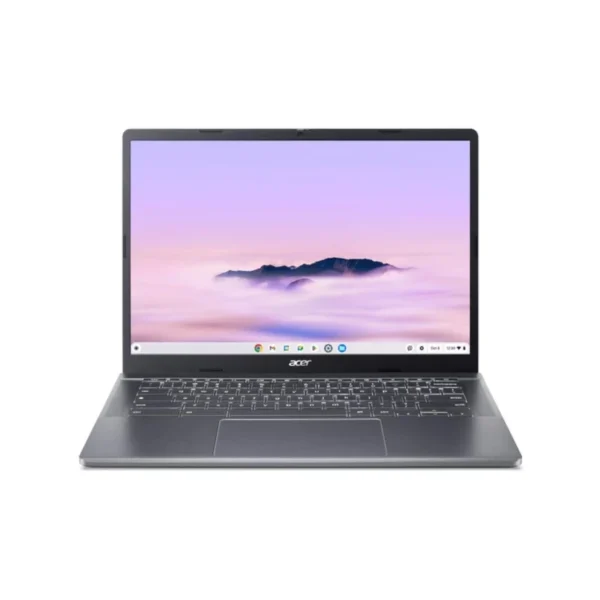

The Acer Chromebook CBE574-1-R53E is designed for users who need a practical computing device for everyday productivity, online activities and work-related tasks. Combining an AMD Ryzen 3 processor, 8GB of LPDDR5X memory, solid-state storage and Google Chrome OS, this Chromebook brings together the core specifications needed for a range of daily computing requirements.
With its 14-inch WUXGA IPS display and slim-bezel design, the Chromebook provides a screen for working with documents, browsing websites, attending online meetings and managing everyday tasks. Its combination of processing power, memory and storage makes it a relevant option for students, professionals, small businesses and home-office users looking for a Chromebook running Google’s operating system.
Everyday Performance with AMD Ryzen 3
At the heart of the Acer Chromebook CBE574-1-R53E is the AMD Ryzen 3 7320C processor. This processor provides the computing foundation for everyday activities such as web browsing, working with online documents, email, research and other routine productivity tasks.
For South African professionals and small businesses, a Chromebook can be a practical choice when daily work revolves around browser-based platforms and online services. Tasks such as accessing web applications, managing correspondence, researching information and preparing documents can form part of a typical working day.
The processor works alongside 8GB LPDDR5X memory. Memory is important when switching between applications and browser tabs, helping support a more practical multitasking experience. This configuration is suitable for users whose regular activities centre on everyday productivity rather than specialist software requirements that have not been confirmed for this model.
14-Inch WUXGA IPS Display with Slim Bezels
The Chromebook features a 14-inch WUXGA IPS display with a slim-bezel design. The 14-inch screen offers a viewing area for documents, spreadsheets, websites, online learning materials and video meetings.
The WUXGA resolution identifies the display’s resolution class, while IPS technology identifies the display panel type. The slim bezels contribute to the product’s screen design without adding unnecessary bulk to the visible display area.
For students, this screen can be used for online coursework, reading digital materials and completing assignments. In a professional environment, it provides a display for correspondence, web-based business applications and document work. Home-office users can also use the screen for personal administration, research and other everyday computing activities.
The supplied product information does not specify the exact screen resolution in pixels, brightness, refresh rate or touchscreen functionality, so these details should be confirmed separately if they are important to your purchasing decision.
128GB PCIe NVMe SSD Storage
The 128GB PCIe NVMe SSD provides storage for the Chromebook’s supported local files and data. Solid-state storage is useful for everyday computing, and the specified PCIe NVMe interface identifies the storage technology included in this model.
The 128GB capacity is worth considering in relation to how you work. Users who mainly access online documents, web applications and cloud-based services may have different storage requirements from those who regularly keep large collections of files locally.
For businesses purchasing devices for employees, understanding the intended workload helps determine whether this storage capacity is appropriate. Students should likewise consider how much coursework, downloaded material and other data they expect to keep on the device.
Google Chrome OS
The Acer Chromebook CBE574-1-R53E runs Google Chrome OS. The operating system is a central consideration when choosing this device, as it determines the software environment in which you will work.
Chrome OS is relevant to users whose workflows rely on web browsing, online platforms and applications supported by the operating system. This makes the Chromebook worth considering for educational settings, everyday office tasks and business environments that use browser-based tools.
Before purchasing for a particular organisation, confirm that the applications and services required by your team are compatible with Chrome OS. Businesses that depend on specific desktop software should verify its availability and functionality rather than assuming that every Windows application can run on this Chromebook.
Wi-Fi 6E and Bluetooth Connectivity
The product specification lists Wi-Fi 6E and Bluetooth connectivity. These features provide wireless networking and Bluetooth connectivity for supported devices and accessories.
Wi-Fi is important for connecting to a suitable wireless network at home, at an educational institution or in an office. Wi-Fi 6E support is a useful specification to consider when reviewing network requirements, although the available wireless bands and performance depend on the network equipment and configuration.
Bluetooth provides a wireless connection option for compatible accessories. The supplied information does not list the exact Bluetooth version or individual supported accessories, so compatibility should be checked for any specific peripheral you intend to use.
FHD USB Camera for Online Communication
The Chromebook includes an FHD USB camera, as listed in the supplied product data. A camera is useful for video communication, online learning and virtual meetings.
For professionals working remotely or participating in online meetings, a built-in camera can help support communication without requiring a separate camera purchase. Students can also use the camera for supported virtual classes and online discussions.
The supplied specification does not confirm additional camera features, such as privacy shutters, microphones, image enhancement or specific video-recording capabilities. These should not be assumed when comparing models.
53Wh Li-ion Battery and 65W Type-C Adapter
The Acer Chromebook CBE574-1-R53E is specified with a 53Wh Li-ion battery and a 65W Type-C adapter.
The battery provides the device’s portable power source, while the supplied adapter is intended for charging and powering the Chromebook as supported by the product. Battery capacity is one factor to consider when selecting a portable computer, particularly for students and professionals who work in different locations.
Actual battery runtime depends on factors such as workload, screen settings, connectivity and usage patterns. Since the supplied product data does not specify a rated battery life, a guaranteed number of hours should not be assumed.
The 65W Type-C adapter is included in the listed configuration, giving buyers the specified power adapter with the device.
Suitable for Study, Home Offices and Everyday Business Tasks
The Acer Chromebook CBE574-1-R53E brings together a 14-inch WUXGA IPS display, an AMD Ryzen 3 7320C processor, 8GB LPDDR5X memory, 128GB PCIe NVMe SSD storage and Google Chrome OS.
This configuration is worth considering for students, home-office users and professionals whose computing needs align with Chrome OS and supported online applications. Small businesses may also consider it for suitable everyday workflows, provided their software and peripheral requirements are compatible.
For South African organisations purchasing multiple devices, it is sensible to assess the operating system, storage capacity, connectivity, intended workload and warranty arrangements before placing an order.
The listed 3-year OSW warranty is an important purchasing consideration. Buyers should confirm the precise coverage, service conditions and any applicable exclusions with the supplier before purchase.
For more options, browse our Acer Products and explore our Chromebook Category. For manufacturer assistance, refer to Official Product Support.
Key Features & Business-Class Highlights
AMD Ryzen 3 7320C processor: Provides the processing platform for everyday computing and supported productivity applications.
8GB LPDDR5X memory: Supports multitasking across compatible applications and browser tabs.
128GB PCIe NVMe SSD: Provides specified solid-state storage for local files and data.
14-inch WUXGA IPS display: Offers a screen for documents, online learning, browsing and everyday work.
Slim-bezel design: Gives the display a slim-bezel appearance.
Google Chrome OS: Provides the operating system for supported Chrome OS applications and browser-based workflows.
Wi-Fi 6E and Bluetooth: Supplies the listed wireless networking and Bluetooth connectivity options.
FHD USB camera: Supports camera-based activities such as online meetings and virtual learning.
53Wh Li-ion battery: Provides the Chromebook’s specified battery capacity.
65W Type-C adapter: Included in the supplied product configuration.
3-year OSW warranty: Provides the stated warranty term, subject to confirmation of the applicable coverage and conditions.
Pros and Cons
Pros
AMD Ryzen 3 7320C processor.
8GB LPDDR5X memory.
128GB PCIe NVMe SSD storage.
14-inch WUXGA IPS display with slim bezels.
Google Chrome OS for supported applications and online workflows.
Wi-Fi 6E and Bluetooth connectivity.
FHD USB camera.
53Wh Li-ion battery.
65W Type-C adapter included in the listed configuration.
Specified 3-year OSW warranty.
Cons
The 128GB storage capacity may not suit users who need to keep large amounts of data locally.
Chrome OS may not meet the needs of users who depend on software that is incompatible with the operating system.
The supplied product data does not confirm battery runtime, display brightness or the full port selection, which may matter to some buyers.
Complete Technical Specifications
| Specification | Details |
|---|---|
| Brand | Acer |
| Product / Model | Chromebook CBE574-1-R53E |
| SKU | NX.KREEA.004 |
| Product Type | Chromebook |
| Display Size | 14 inches |
| Display Resolution Class | WUXGA |
| Display Panel | IPS |
| Display Design | Slim bezel |
| Processor Brand | AMD |
| Processor | AMD Ryzen 3 7320C |
| Memory | 8GB LPDDR5X |
| Storage Capacity | 128GB |
| Storage Type | PCIe NVMe SSD |
| Wireless Networking | Wi-Fi 6E |
| Bluetooth | Supported; version not specified |
| Camera | FHD USB camera |
| Battery Capacity | 53Wh |
| Battery Type | Li-ion |
| Power Adapter | 65W Type-C adapter |
| Operating System | Google Chrome OS |
| Warranty | 3 years OSW |






Reviews
There are no reviews yet.