
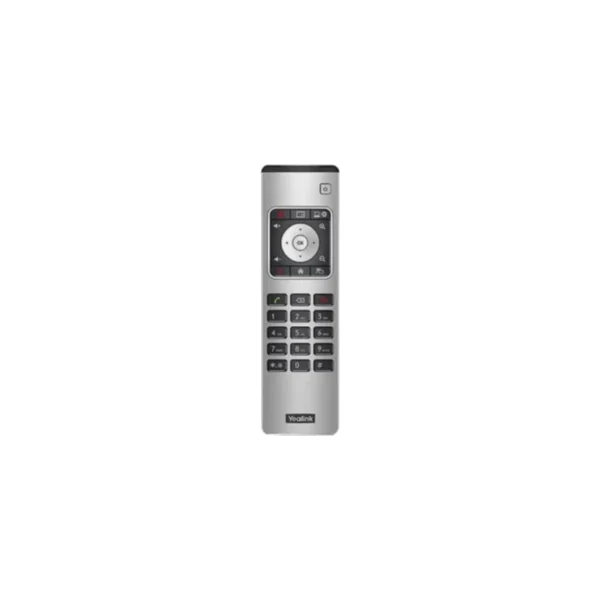

Yealink VCR11 Remote for Professional Video Conferencing
The Yealink VCR11 Remote is designed to make operating compatible Yealink video conferencing equipment simple and convenient. For businesses that rely on video meetings for internal collaboration, customer discussions, remote teams and hybrid working, having dedicated physical controls can make meeting-room operation more straightforward.
Rather than depending entirely on a connected computer or touchscreen interface, the VCR11 provides direct access to commonly used conferencing functions. Its button-based design allows users to navigate menus, adjust volume, control camera functions and manage calls from a practical handheld remote.
For South African SMEs and corporate environments, this can be particularly useful in dedicated boardrooms, training rooms, executive meeting spaces and smaller conference rooms where ease of use matters. A meeting-room solution needs to be accessible to different users throughout the working day, and a dedicated remote can help reduce the learning curve for employees who are not familiar with the underlying conferencing technology.
The VCR11 is part of the wider Yealink ecosystem and is supported on compatible Yealink conferencing platforms. Yealink documentation identifies the VCR11 as a supported remote controller for various MeetingBar and video-conferencing solutions.
Key Features & Business-Class Highlights
Dedicated Meeting Controls
The VCR11 provides dedicated physical buttons for frequently used conferencing functions. This includes power control, video recording, layout adjustment, volume control, zoom, navigation and call management.
The remote includes a directional navigation pad and OK button, making it possible to move through on-screen menus without requiring a separate keyboard or mouse. This is useful when a conferencing endpoint is installed in a meeting room and users need to control it from a distance.
Convenient Camera Control
Camera controls are particularly useful during video meetings. The VCR11 supports zoom control and navigation functions that can be used with compatible Yealink conferencing systems. Yealink also documents support for camera presets, with the VCR11 allowing users to apply or replace presets using the number keys on supported MeetingBar systems.
For a business meeting, this can make switching between predefined camera positions quicker and more practical. For example, a meeting room may have preset positions configured for a presenter, boardroom table or wider room view.
Simple Call Management
The remote includes dedicated off-hook and on-hook controls for placing, answering and ending calls on supported systems. It also includes a keypad for entering numbers and other characters.
This provides a familiar telephone-style experience and can be useful when a meeting-room system is being operated independently of a user’s laptop.
Recording and Layout Functions
The dedicated video recording key allows compatible systems to start or stop video and audio recording. The layout key can be used to adjust the meeting display layout where supported.
These controls can be valuable for businesses conducting presentations, training sessions, internal meetings or other sessions where recording and display management form part of the workflow.
Practical for Hybrid Workplaces
Hybrid work has made reliable meeting-room technology an important part of everyday business operations. South African companies may have employees working from home, branches operating in different provinces, customers joining remotely or distributed project teams collaborating across locations.
A dedicated remote control gives meeting participants an uncomplicated way to interact with compatible conferencing equipment. This is especially useful where the meeting organiser does not want to operate the system from a laptop throughout the entire meeting.
Built for Yealink Conferencing Environments
The VCR11 is designed as part of Yealink’s video-conferencing accessory ecosystem rather than as a general-purpose universal remote. Compatibility should therefore be checked against the specific Yealink conferencing endpoint before purchase.
Yealink’s current support documentation lists the VCR11 among its remote-control options and identifies it as supported by selected MeetingBar and MeetingEye products.
For businesses purchasing conferencing equipment as part of a larger deployment, this makes the VCR11 a practical accessory to consider when physical room control is required.
You can also explore our range of Video Conferencing Accessories for additional meeting-room equipment and compatible solutions.
Suitable for South African Business Use
The Yealink VCR11 can be a useful addition to meeting rooms used by SMEs, larger organisations, educational institutions, training providers and professional services businesses.
In a typical South African office environment, meeting-room equipment may be shared by multiple employees throughout the day. A physical remote provides an immediately recognisable interface, allowing users to perform common functions without needing extensive technical training.
It can also be useful for boardrooms where the conferencing equipment is positioned at a distance from the participants. Instead of requiring someone to walk to the display or connect a laptop to operate the system, users can control compatible functions directly from the remote.
For IT departments and system administrators, maintaining a consistent conferencing setup across multiple rooms can also make everyday operation easier. However, compatibility should always be confirmed before ordering, particularly when replacing a lost or damaged remote.
Official Vendor Support
For product documentation, compatibility information, firmware-related resources and technical assistance, refer to the Official Yealink Support Page.
Pros and Cons
Pros
- Dedicated physical controls for compatible Yealink conferencing systems
- Simple button-based interface suitable for shared meeting rooms
- Supports common meeting functions including calling, navigation and volume control
- Dedicated zoom and layout controls on supported systems
- Video recording control on compatible endpoints
- Supports camera preset control on compatible Yealink MeetingBar systems
- Useful for boardrooms, training rooms and hybrid-work environments
- Compact accessory for businesses already using compatible Yealink equipment
Cons
- Designed for compatible Yealink conferencing systems rather than universal use
- Function availability can vary depending on the connected Yealink endpoint and software mode
- Businesses should verify compatibility before purchasing as a replacement remote
- Does not replace the functionality of a full Yealink touch controller where advanced room management is required
Complete Technical Specifications
| Specification | Details |
|---|---|
| Brand | Yealink |
| Product | VCR11 Remote |
| Product Type | Video Conferencing Remote Control |
| Model | VCR11 |
| SKU | VCR11 |
| Primary Use | Control of compatible Yealink video conferencing systems |
| Power Control | Yes |
| Video Recording Control | Yes, on supported systems |
| Layout Control | Yes |
| Volume Control | Yes |
| Zoom Control | Yes |
| Navigation | Directional navigation pad |
| Confirmation | OK button |
| Mute | Yes |
| Home/Menu | Yes |
| Back/Return | Yes |
| Call Answer | Yes |
| Call End | Yes |
| Numeric Keypad | Yes |
| Camera Presets | Supported on compatible systems |
| Compatibility | Selected Yealink video conferencing endpoints |
| Warranty | Not specified in supplied product data — confirm with reseller |





Reviews
There are no reviews yet.