
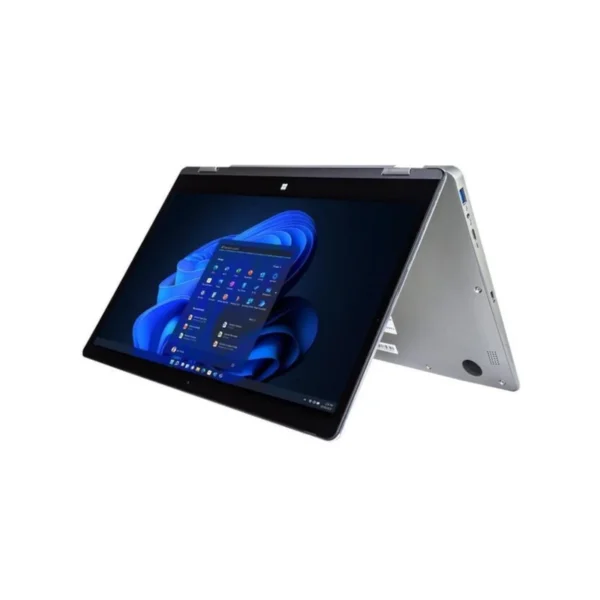

Mecer Move YA13Q50-LTE – Compact Business Productivity for Life on the Move
The Mecer Move YA13Q50-LTE is designed for professionals and organisations that value portability, connectivity and practical everyday productivity. With its compact 13.3-inch Full HD multi-touch display, built-in 4G/LTE connectivity and Windows 11 Pro operating system, it is suited to modern working environments where employees may move between the office, home, client sites, classrooms and remote locations.
For South African hybrid workers, reliable connectivity can be just as important as processing power. The built-in 4G/LTE capability provides an additional connectivity option when Wi-Fi is unavailable, making the Mecer Move particularly useful for mobile professionals working between meetings, customer sites, branches or temporary workspaces. Users should note that mobile connectivity requires a compatible SIM/data service from a network provider.
Under the hood, the notebook uses an Intel Celeron N4120 quad-core processor, with speeds of up to 2.6GHz. It is paired with 4GB LPDDR4 memory and a 128GB SATA SSD, providing a practical configuration for everyday business applications, web browsing, email, Microsoft Office work, cloud-based systems, online learning and general productivity. The 128GB SSD also provides faster storage responsiveness than traditional mechanical hard drives.
The system is best positioned as a light-duty productivity machine, rather than a workstation for demanding professional applications. Its 4GB memory and entry-level Intel processor are appropriate for everyday tasks, but users working with large datasets, intensive creative applications, advanced video editing or heavy multitasking should consider a higher-specification business notebook.
Key Features & Business-Class Highlights
13.3″ Full HD Multi-Touch Display
The 13.3-inch display provides a compact working area while maintaining a Full HD 1920 × 1080 resolution. The capacitive multi-touch panel supports up to 10-point touch input, giving users another intuitive way to interact with Windows and compatible applications. The IPS LED-backlit panel is particularly useful for mobile productivity and presentations.
Intel Celeron N4120 Performance
The Intel Celeron N4120 is a quad-core processor designed for everyday computing. With a base frequency of 1.1GHz and burst speeds of up to 2.6GHz, it can handle common office and productivity workloads such as email, browser-based platforms, documents, spreadsheets and video conferencing.
4GB RAM and 128GB SSD
The integrated 4GB LPDDR4 memory is suitable for basic productivity requirements. The 128GB SSD provides responsive storage for Windows, business documents and essential applications. Importantly for business buyers, the available specification indicates that the 4GB memory is onboard and not user-upgradable, so organisations should consider expected workload requirements before purchasing.
Built-In 4G/LTE Connectivity
One of the standout features is integrated 4G/LTE connectivity. For South African professionals who frequently work outside a traditional office environment, this can provide a valuable alternative to public Wi-Fi or mobile phone tethering. It can be particularly useful for travelling consultants, field workers, sales teams and hybrid employees.
Windows 11 Pro
The supplied configuration runs Microsoft Windows 11 Pro, making the notebook suitable for professional environments that require the Pro edition of Windows. Businesses can integrate it into their existing Windows-based workflows and use familiar productivity applications and cloud services.
Touchscreen and Microsoft Ink
The Mecer Move includes Microsoft Ink support and an active stylus, allowing users to write notes, annotate compatible documents and interact naturally with the touchscreen. This can be useful during meetings, consultations, training sessions and classroom environments.
Practical Connectivity
Connectivity includes 802.11 b/g/n Wi-Fi, Bluetooth, two USB 3.0 ports, Mini HDMI and a Micro SD card reader. This gives users practical options for connecting peripherals, external displays and removable storage. The built-in 0.3MP camera, microphone and speakers also support basic online communication and video conferencing.
Portable Design
At approximately 1.4kg, the Mecer Move is easy to carry between home and office environments. Its compact footprint makes it suitable for professionals who work from smaller desks, meeting rooms, client premises or shared workspaces. The supplied sleeve adds practical protection during transport.
Useful for South African SMEs
For small businesses looking for an affordable notebook for email, documents, browser applications, administration and remote work, the Mecer Move offers a practical combination of mobility and connectivity. Its LTE capability can also help employees remain connected while travelling between branches or customer locations.
Businesses purchasing multiple units should nevertheless evaluate their software requirements carefully. The 4GB RAM configuration is intentionally modest and is better suited to straightforward productivity workloads than intensive multitasking.
For customers comparing products from the same manufacturer, explore our [Mecer laptops and notebooks – brand link] or browse our [Laptops & Notebooks – category link] for additional business computing options.
For drivers, product support and troubleshooting information, visit the [Official Mecer Support Page] Official Mecer Support Page.
Who Is the Mecer Move YA13Q50-LTE For?
The Mecer Move is particularly suitable for:
- Hybrid professionals who work between home, office and client locations.
- Small and medium-sized businesses needing practical everyday notebooks.
- Sales and field personnel who can benefit from built-in LTE connectivity.
- Students and training professionals requiring a portable Windows device.
- Administrative staff working with email, documents, spreadsheets and browser-based systems.
- Mobile users who value a compact form factor, touchscreen and stylus functionality.
It is less suited to users requiring workstation-level performance, large-scale data processing, professional video editing, demanding 3D applications or extensive multitasking.
Connectivity for Modern Hybrid Work
South African businesses increasingly need technology that works beyond the traditional office. The combination of Wi-Fi, Bluetooth and integrated LTE gives the Mecer Move flexibility for different working environments.
A consultant could use Wi-Fi at the office, LTE while travelling and Bluetooth for wireless peripherals. A field worker could connect to mobile data without relying exclusively on public Wi-Fi. A trainer or educator can use the touchscreen and stylus for interactive presentations and handwritten notes.
The Mini HDMI output also provides a practical way to connect the notebook to a compatible external display or projector for meetings and presentations.
Storage and Expansion
The integrated 128GB SATA SSD provides fast and practical storage for the operating system, productivity software and everyday files. A Micro SD card reader is also available for compatible removable storage, giving users another option for transferring or storing files.
Because 128GB is relatively limited for users who store substantial media collections or large business datasets locally, businesses may want to make use of cloud storage, network storage or external storage where appropriate.
Warranty and Business Considerations
The exact YA13Q50-LTE specification is listed by South African sources with a 1-year carry-in warranty. Warranty terms can vary by supplier, so customers should confirm the applicable warranty conditions at the point of purchase.
For businesses deploying the device across a team, it is also worth considering the intended application workload, required storage capacity and number of simultaneously running applications. The Mecer Move’s strengths are its compact design, LTE connectivity, touchscreen functionality and practical everyday productivity, rather than high-performance computing.
Pros and Cons
Pros
- Compact and portable 13.3-inch form factor.
- Full HD 1920 × 1080 touchscreen display.
- Built-in 4G/LTE connectivity for mobile working.
- Intel quad-core Celeron N4120 processor.
- 128GB SSD for responsive everyday storage.
- Windows 11 Pro for professional use.
- Includes Microsoft Ink active stylus.
- Includes protective sleeve.
- Wi-Fi and Bluetooth connectivity.
- USB 3.0, Mini HDMI and Micro SD connectivity.
- Fingerprint reader for convenient authentication.
- Suitable for everyday office, education and hybrid-work tasks.
Cons
- 4GB RAM is limited for heavy multitasking.
- Memory is onboard and listed as supporting a maximum of 4GB, limiting future memory expansion.
- 128GB storage may be restrictive for users with large local file libraries.
- Intel Celeron N4120 is intended for everyday productivity rather than demanding workloads.
- 0.3MP webcam is basic compared with newer business notebooks.
- Wi-Fi specification is 802.11 b/g/n rather than newer Wi-Fi generations.
- Integrated graphics are designed for general productivity rather than demanding graphics workloads.
Complete Technical Specifications
| Specification | Details |
|---|---|
| Brand | Mecer |
| Series / Model | Mecer Move YA13Q50-LTE |
| SKU | YA13Q50-LTE |
| Product Type | Notebook / Laptop |
| Operating System | Microsoft Windows 11 Pro 64-bit |
| Processor | Intel Celeron N4120 |
| Processor Cores | Quad Core / 4 Cores |
| Processor Base Frequency | 1.10GHz |
| Processor Burst Frequency | Up to 2.60GHz |
| Processor Cache | 4MB |
| Memory | 4GB LPDDR4 onboard |
| Maximum Memory | 4GB |
| Memory Slots | No memory slots |
| Storage | 128GB SATA III SSD |
| Storage Expansion | Supports Micro SD card |
| Display Size | 13.3-inch |
| Display Resolution | Full HD 1920 × 1080 |
| Display Type | IPS LED-backlit |
| Touchscreen | Capacitive multi-touch |
| Touch Support | Up to 10-point touch |
| Graphics | Intel UHD Graphics 600 |
| Wireless LAN | 802.11 b/g/n, 2.4GHz |
| Bluetooth | Bluetooth |
| Mobile Connectivity | Built-in 4G/LTE |
| SIM Support | Micro SIM |
| Webcam | 0.3MP |
| Audio | Built-in speakers and microphone |
| USB Ports | 2 × USB 3.0 |
| Video Output | 1 × Mini HDMI |
| Card Reader | Micro SD |
| Stylus Support | Microsoft Ink |
| Included Stylus | Active stylus pen |
| Security | Fingerprint reader / Windows Hello |
| Battery | Li-Polymer, 5000mAh, 7.4V |
| Battery Runtime | Up to approximately 10 hours depending on environment/use |
| Colour | Light Grey |
| Dimensions | Approximately 310 × 211 × 13.5mm |
| Weight | Approximately 1.4kg |
| Included Accessories | Charger, active stylus and sleeve |
| Warranty | 1-year carry-in warranty |
Grey.





Reviews
There are no reviews yet.