
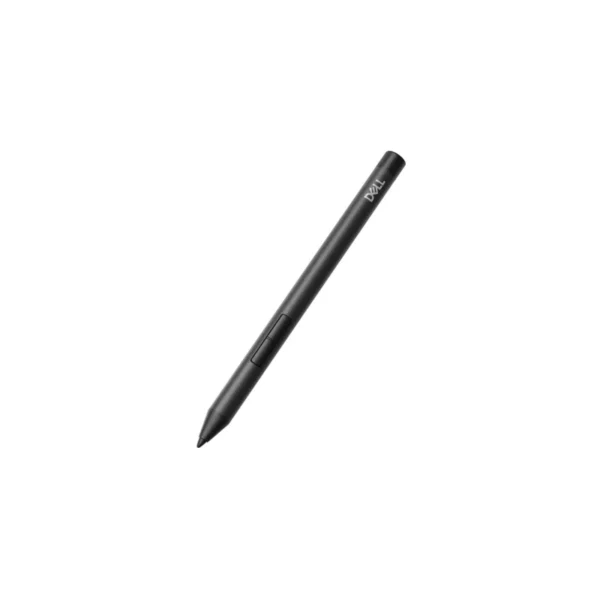

Dell Pro Active Pen PN526 | 4096 Pressure Levels | Multi-Protocol
Dell Pro Active Pen PN526 – Precise Digital Input for Modern Work
Modern business environments increasingly rely on flexible, touch-enabled devices for meetings, presentations, digital documentation and hybrid collaboration. The Dell Pro Active Pen PN526 provides a practical way to turn a compatible notebook or 2-in-1 into a more versatile productivity tool.
Whether you’re taking handwritten notes during a client meeting, marking up documents, signing digital paperwork or sketching ideas during a brainstorming session, the PN526 is designed to provide controlled and responsive pen input. Its active stylus technology supports 4,096 levels of pressure sensitivity, allowing the pen to respond naturally to changes in writing pressure.
For South African professionals who regularly move between the office, home and client locations, this flexibility can be particularly useful. Instead of relying solely on a keyboard and touchpad, users can interact directly with supported touch displays for a more intuitive workflow.
Key Features & Business-Class Highlights
4,096 Pressure Levels for Precise Input
The PN526 offers 4,096 levels of pressure sensitivity, providing greater control over strokes and input. This is useful for handwritten notes, annotations, diagrams and other precision-based tasks. For creative professionals, the pressure sensitivity can also provide more natural control in compatible applications.
Multi-Protocol Compatibility
One of the major advantages of the PN526 is its support for multiple active stylus protocols. Dell lists compatibility with AES 1.0, AES 2.0, WGP, USI 2.0 and MPP 2.0. This broad protocol support can make the pen a practical accessory for organisations operating a variety of compatible notebook and 2-in-1 configurations.
Compatibility should still be checked against the specific laptop or 2-in-1 model before purchase, as stylus functionality depends on the device’s supported protocol.
Palm Rejection Technology
Palm rejection helps distinguish pen input from accidental contact when the user’s hand rests on a compatible touchscreen. This can make longer writing and annotation sessions more comfortable and controlled.
Two Buttons for Convenient Control
The PN526 incorporates two buttons, providing additional control options when supported by the host device and software. This can be useful when switching between functions without repeatedly reaching for the keyboard or touchscreen controls.
Replaceable Stylus Tip
The stylus features a replaceable tip, extending its practical service life and making it easier to maintain the accessory for continued business use. The package includes two nibs as well as a nib remover.
Long Battery Runtime
The PN526 uses one included AAAA battery and offers a maximum stated battery runtime of up to 12 months. Dell notes that runtime for laptops and 2-in-1 devices using the MPP protocol can be up to 8 months.
For professionals travelling between offices, customer sites and home, the long battery life reduces the need for frequent battery replacement and helps keep the pen ready for day-to-day use.
Built for Hybrid Professionals and Business Environments
The PN526 is particularly suited to users who want to make greater use of their compatible touch-enabled business devices.
For SMEs, a digital pen can help employees annotate documents, capture meeting notes and interact with touchscreen applications without adding a complicated peripheral setup. Its plug-and-play design makes it straightforward to integrate with supported devices.
For corporate users, the pen can complement touchscreen notebooks and 2-in-1 devices used for presentations, field work, digital forms and collaborative sessions. Professionals who regularly work from home and the office can also benefit from having a compact input accessory that travels easily with their laptop.
At approximately 10.4 g, with a length of 140 mm and diameter of 9.5 mm, the PN526 is lightweight enough to carry in a laptop bag without adding significant bulk.
A Practical Accessory for Compatible Dell and Multi-Protocol Devices
The PN526 supports Windows 10, Windows 11 and ChromeOS, although actual pen functionality depends on the compatible device and supported protocol. Dell also lists integration with Dell Display and Peripheral Manager on supported Windows systems, with this integration not supported when using USI and MPP protocols.
If you’re upgrading a business touchscreen setup, consider pairing the PN526 with your existing [Dell laptops and accessories (Dell brand link)] or exploring our [stylus pens and input accessories (Tablet & Stylus category link)] for additional compatible options.
For product documentation, drivers and troubleshooting resources, visit the official Dell PN526 Support Page.
What’s Included
The retail package includes the Dell Pro Active Pen PN526, two replacement nibs, one AAAA battery and a nib remover. This means users can begin using the pen immediately with a compatible device without purchasing the initial battery separately.
Warranty and Business Confidence
The Dell Pro Active Pen PN526 is supplied with a 3-year limited warranty, giving businesses and professional users additional coverage for their investment. Warranty terms and service availability can vary by region, so South African customers should confirm the applicable local warranty conditions at the time of purchase. Dell provides support resources for product assistance, service status and warranty information.
Pros and Cons
Pros
- 4,096 pressure levels provide precise and responsive pen input.
- Supports multiple protocols: AES 1.0, AES 2.0, WGP, USI 2.0 and MPP 2.0.
- Palm rejection helps improve writing and annotation comfort.
- Two buttons provide additional input functionality.
- Replaceable stylus tip helps extend product usability.
- Includes two nibs, AAAA battery and nib remover.
- Lightweight 10.4 g design is well suited to mobile and hybrid professionals.
- Up to 12 months of maximum battery runtime.
- Backed by a 3-year limited warranty.
Cons
- Compatibility depends on the touchscreen device’s supported stylus protocol.
- MPP-compatible laptops and 2-in-1 devices may have a shorter stated runtime of up to 8 months.
- The AAAA battery is replaceable rather than rechargeable.
- Dell Display and Peripheral Manager integration does not support USI and MPP protocols.
For businesses and professionals using compatible touchscreen notebooks or 2-in-1 devices, the Dell Pro Active Pen PN526 offers a compact and flexible way to add accurate pen-based interaction to everyday workflows.
| Specification | Details |
|---|---|
| Product | Dell Pro Active Pen – PN526 |
| Dell Part Number / SKU | 750-BBWW |
| Manufacturer Part | 8DPKJ |
| Device Type | Active stylus |
| Supported Device | Notebook |
| Pressure Levels | 4,096 |
| Stylus Technology | Active |
| Pressure Sensitivity | Yes |
| Palm Rejection | Yes |
| Plug and Play | Yes |
| Replaceable Stylus Tip | Yes |
| Number of Buttons | 2 |
| Supported Protocols | AES 1.0, AES 2.0, WGP, USI 2.0, MPP 2.0 |
| Battery Type | AAAA |
| Number of Batteries | 1 |
| Battery Included | Yes |
| Maximum Battery Runtime | Up to 12 months |
| MPP Runtime | Up to 8 months |
| Supported Operating Systems | Windows 10, Windows 11, ChromeOS |
| Software Integration | Dell Display and Peripheral Manager on supported Windows systems |
| USI/MPP Manager Support | Not supported |
| Length | 140 mm |
| Diameter | 9.5 mm |
| Weight | Approx. |
| 10.4 g | Package Contents | PN526 pen, 2 × nibs, 1 × AAAA battery, nib remover | Warranty | 3-year limited warranty |







Reviews
There are no reviews yet.